OpenTelemetry for LLM Applications: A Practical Guide with LaunchDarkly and Langfuse

Published February 27, 2026

portrait of Alexis Roberson.

by Alexis Roberson

LLM applications have a telemetry problem. Unlike traditional software where you can trace a bug to a specific line of code or a failed API call, LLM failures are a bit more nuanced. A response that’s slightly off, a prompt that worked yesterday but not today, or a model swap can quietly degrade your user experience. OpenTelemetry gives you a structured way to pull back the curtain by capturing token usage, model metadata, latency, and agent responses so you truly know what’s happening inside your application.

This tutorial walks you through instrumenting a real LLM application with OTel spans, capturing the right attributes, and fanning out those traces simultaneously to Langfuse and LaunchDarkly’s Guarded Releases. Both are LLM observability tools, but they give you different lenses on the same trace data. Langfuse is purpose-built for prompt debugging and cost analysis — surfacing prompt content, completions, and per-agent token usage.

LaunchDarkly connects that same trace data to the specific model variant that was active during a request, giving you flag-correlated observability with automated rollback if a variant starts degrading your users’ experience. One OTel collector, two complementary views, no custom integrations required.

Guarded releases are LaunchDarkly’s observability solution that encompasses application performance thresholds, release auto-remediation, and release monitoring, along with error monitoring and session replay.

The WorkLunch App

In order to see the full process of instrumenting an LLM application, I added a new feature in an app called WorkLunch where users were able to create/join office communities and swap lunches based on preference. Now they’re also able to improve the description field of their lunch post to make it more appealing to potential swappers and receive recommendations for compatible swaps.
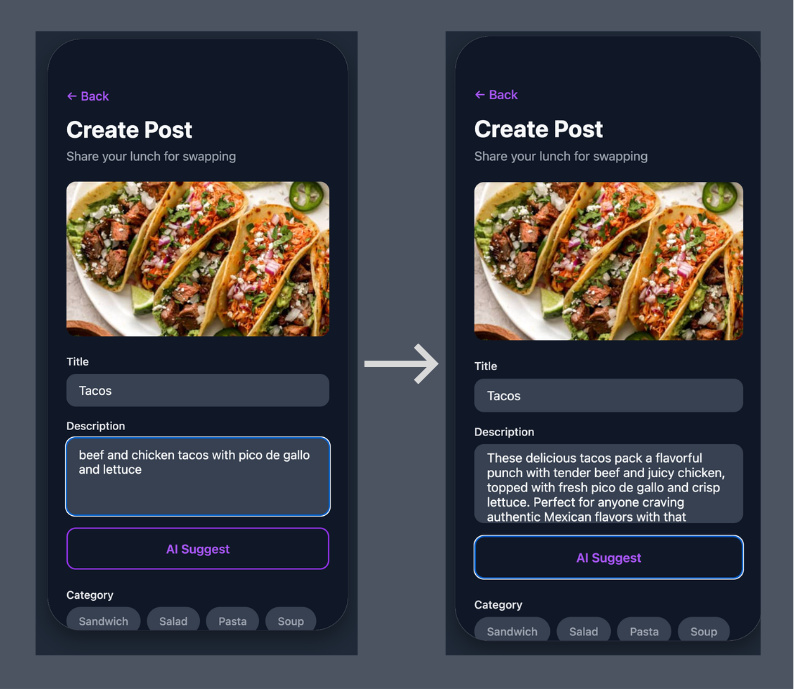
WorkLunch AI Suggest Feature

The WorkLunch AI Suggest feature in action.

So in the initial description you may write, “Grilled cheese sandwich”, then click the AI Suggest button. The app replaces it with, “Golden, buttery grilled cheese with perfectly melted cheese sandwiched between crispy white bread. This comfort food classic is grilled to perfection with a satisfying crunch on the outside and gooey, cheesy goodness on the inside. Simple, delicious, and guaranteed to hit the spot!”

Now which lunch post are you more than likely to click on?

This subtle addition takes the app from a fun, simple lunch swap experience to a viable LLM application that still requires the same visibility and observability of traditional systems. OpenTelemetry allows you to extract the necessary data like token count, model name, agent responses, etc in order to properly debug system failures.

Multi-Agent Architecture
Multi-agent diagram

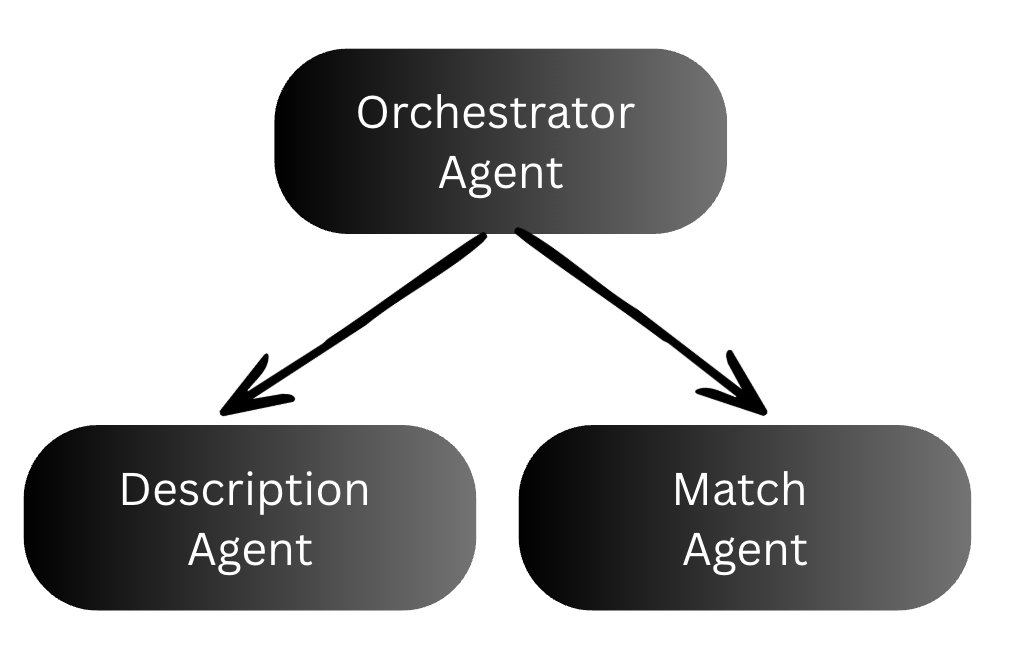
Multi-agent architecture diagram showing the orchestrator, description agent, and match agent.

The WorkLunch backend uses 3 agents to rewrite the lunch post description and find good lunch swaps.

  1. The orchestrator coordinates the other two agents. It receives the user’s request and the model type, calls the description agent first, then passes the generated description into the match agent. It acts as the parent span that ties the whole chain together.
  2. The description agent takes the user’s sparse lunch post input and calls Claude to generate an appealing 2-3 sentence description.
  3. The match agent takes the user’s lunch post (including the description just generated) plus a list of other active posts in the community, and uses AI to suggest 2-3 posts that would make good swaps.

These features are controlled by two feature flags, one for enabling the AI suggest feature and the other to control which model version the app uses. Every layer gets its own OTel span, creating a trace tree that shows the full request lifecycle.

Prerequisites

Before you start, you’ll need the following installed locally and accounts set up with the services below.

Environment variables

Once you’re all setup, clone the WorkLunch repo. Copy the example .env file and fill in your values:

$cp .env.example .env

Your .env should contain:

$# .env
$
$# Supabase (required for the app)
$EXPO_PUBLIC_SUPABASE_URL=https://your-project.supabase.co
$EXPO_PUBLIC_SUPABASE_ANON_KEY=your-anon-key
$
$# LaunchDarkly client-side (required for feature flags in the frontend)
$EXPO_PUBLIC_LAUNCHDARKLY_SDK_KEY=mob-your-mobile-key
$EXPO_PUBLIC_LAUNCHDARKLY_CLIENT_SIDE_ID=your-client-side-id
$
$# AI Backend URL (where docker compose runs the Python backend)
$EXPO_PUBLIC_AI_BACKEND_URL=http://localhost:8000
$
$# --- Docker Compose vars (used by the backend + otel-collector) ---
$
$# Anthropic API key for Claude
$ANTHROPIC_API_KEY=sk-ant-your-key-here
$
$# LaunchDarkly server-side SDK key (starts with sdk-, NOT mob-)
$LD_SDK_KEY=sdk-your-key-here
$
$# Langfuse auth — Base64 of "public_key:secret_key" (keep on one line)
$LANGFUSE_AUTH_HEADER=your-base64-encoded-string

Supabase setup

  1. Create a new Supabase project and grab your Project URL and Anon key from Dashboard → Settings → API
  2. Run the migration files in supabase/migrations/ to create the database schema. Execute them in order in the Supabase Dashboard → SQL Editor:
supabase/migrations/
20240101000000_initial_schema.sql ← tables: profiles, spaces, posts, proposals, messages, trades
20240101000001_rls_policies.sql ← row-level security policies
20240101000002_storage_setup.sql ← storage bucket for post photos
20240101000003_disable_email_confirmation.sql ← simplifies local dev auth
20240205000000_fix_space_memberships_rls_recursion.sql
20240205000001_spaces_delete_policy.sql
20240206000000_space_creator_as_admin.sql
20240206100000_delete_space_rpc.sql

Be sure to run each file in order as later migrations depend on tables and policies from earlier ones.

LaunchDarkly setup

Create two feature flags in your new LaunchDarkly worklunch project:

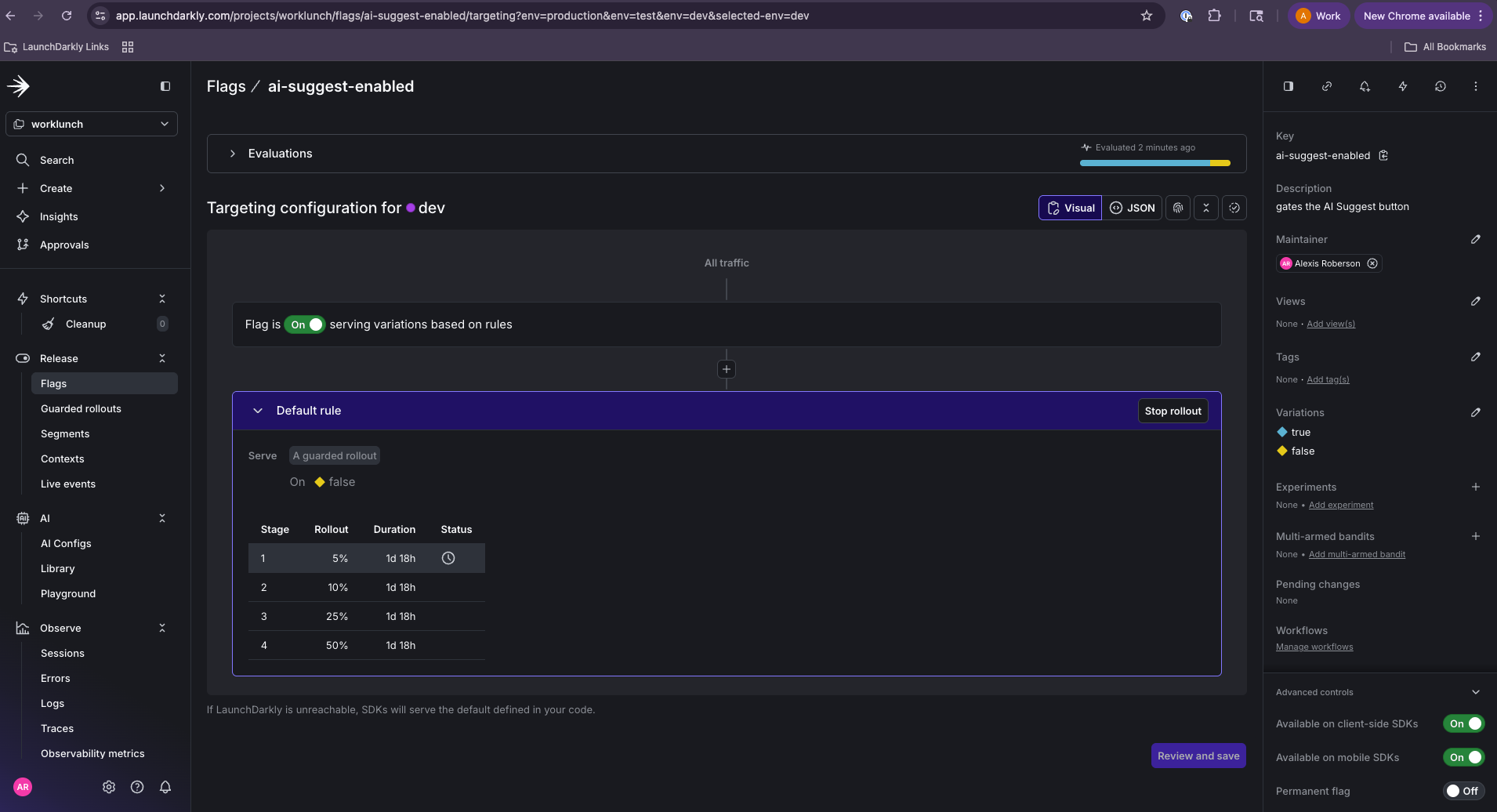
  1. ai-suggest-enabled — Boolean flag, client-side. Gates visibility of the AI Suggest button in the frontend. Set it to true for users you want to test with.
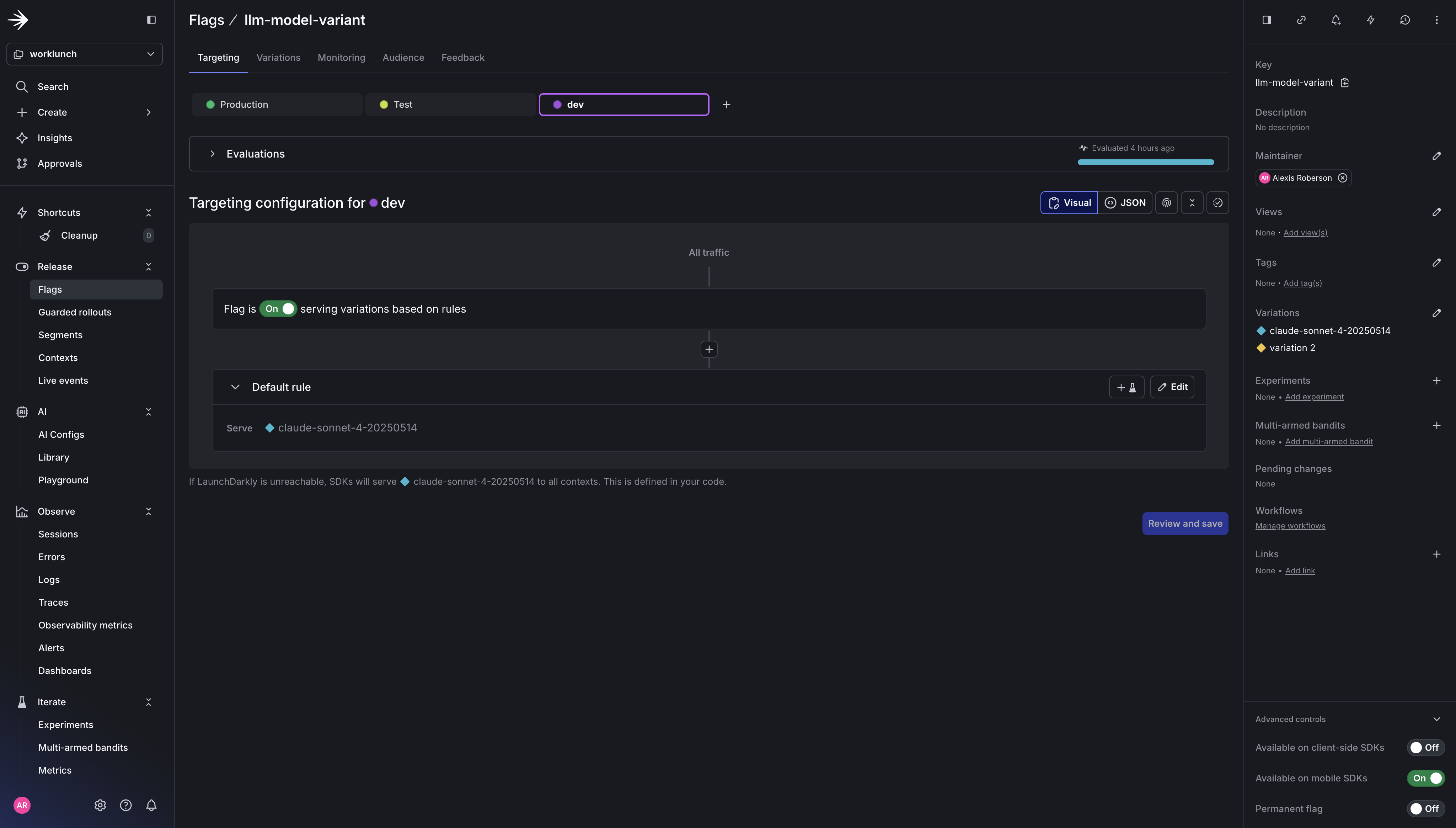
  2. llm-model-variant — String flag, server-side. Controls which Claude model the backend uses. Set the default value to claude-sonnet-4-20250514. Add a variation for claude-haiku-4-5-20251001 if you want to experiment with a faster/cheaper model.
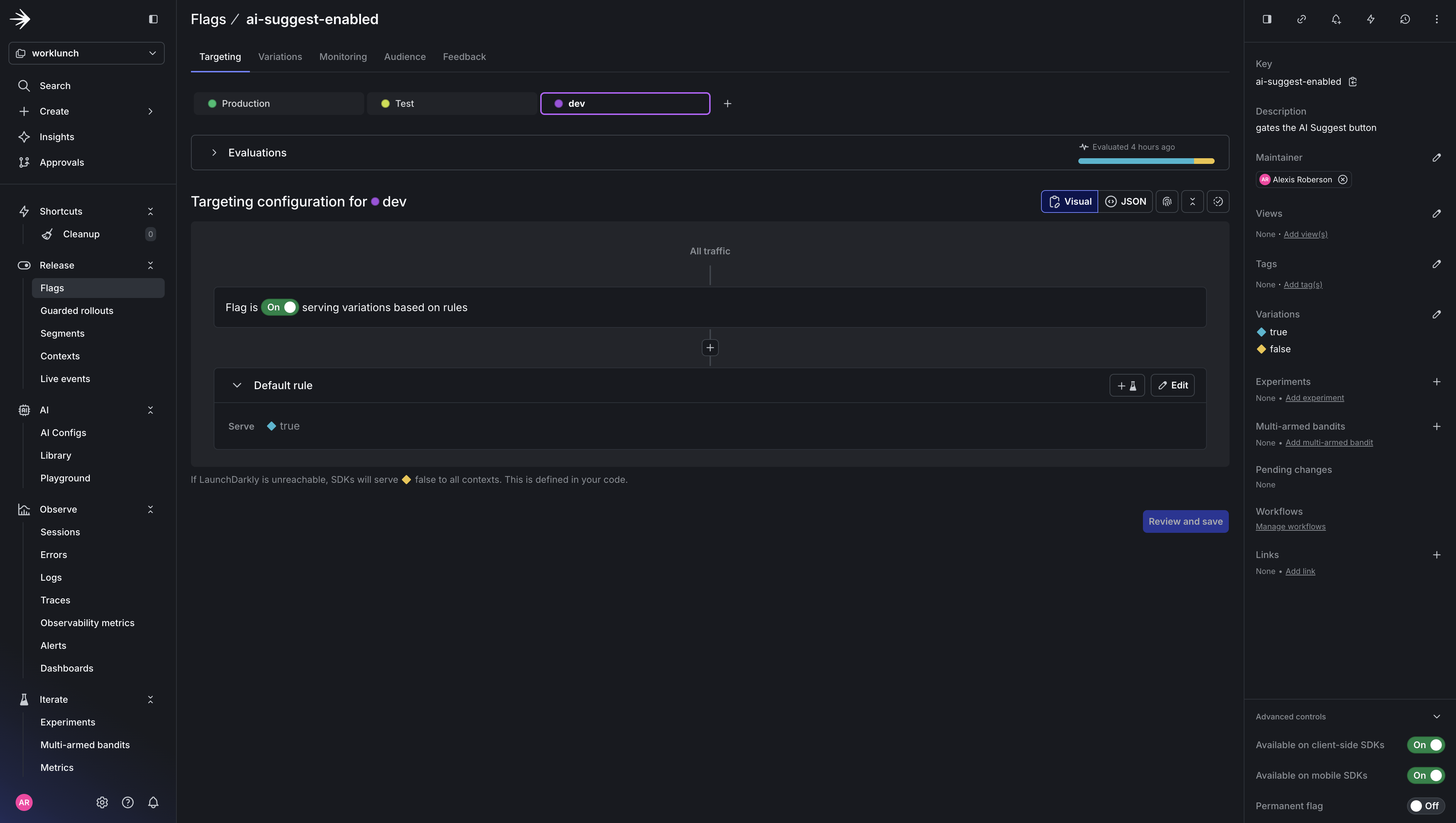
ai-suggest-enabled feature flag

The ai-suggest-enabled feature flag configuration in LaunchDarkly.

llm-model-variant feature flag

The llm-model-variant feature flag configuration in LaunchDarkly.

Langfuse setup

  1. Create a new project in Langfuse (note whether your project URL starts with us.cloud.langfuse.com or cloud.langfuse.com — this determines your region)
  2. Go to Project Settings → API Keys and create a new key pair
  3. Generate your Base64 auth header and place it inside your .env file:
$echo -n "pk-lf-your-public-key:sk-lf-your-secret-key" | base64

Quick Start

Once your .env is configured:

$# Install frontend dependencies
$npm install
$
$# Start the OTel Collector + Python backend
$docker compose up --build
$
$# In a separate terminal, start the Expo dev server
$npm run web

Verify traces are flowing by checking the collector logs:

$docker compose logs -f otel-collector

You should see spans with gen_ai.* attributes and feature_flag events printed by the debug exporter.

Now, let’s take a look at how each agent is instrumented to send spans to LaunchDarkly.

Step 1: Instrument your LLM application

Initialize the Tracer and Application

The FastAPI app sets up OTel, LaunchDarkly, CORS, and auto-instrumentation in a single lifespan handler:

1# backend/app/main.py
2from contextlib import asynccontextmanager
3
4import ldclient
5from fastapi import FastAPI
6from fastapi.middleware.cors import CORSMiddleware
7from opentelemetry import trace
8from opentelemetry.exporter.otlp.proto.grpc.trace_exporter import OTLPSpanExporter
9from opentelemetry.instrumentation.fastapi import FastAPIInstrumentor
10from opentelemetry.sdk.trace import TracerProvider
11from opentelemetry.sdk.trace.export import BatchSpanProcessor
12
13from app.config import settings
14from app.routers.suggest import router as suggest_router
15
16def setup_otel() -> None:
17 """Configure OpenTelemetry with OTLP gRPC exporter."""
18 provider = TracerProvider()
19 provider.add_span_processor(
20 BatchSpanProcessor(
21 OTLPSpanExporter(endpoint=settings.OTEL_EXPORTER_ENDPOINT, insecure=True)
22 )
23 )
24 trace.set_tracer_provider(provider)
25
26def setup_launchdarkly() -> None:
27 """Initialize LaunchDarkly server SDK."""
28 config = ldclient.Config(settings.LD_SDK_KEY)
29 ldclient.set_config(config)
30
31@asynccontextmanager
32async def lifespan(app: FastAPI):
33 setup_otel()
34 setup_launchdarkly()
35 yield
36 ldclient.get().close()
37 provider = trace.get_tracer_provider()
38 if hasattr(provider, "shutdown"):
39 provider.shutdown()
40
41app = FastAPI(title="WorkLunch AI Backend", lifespan=lifespan)
42
43# CORS
44app.add_middleware(
45 CORSMiddleware,
46 allow_origins=["*"],
47 allow_credentials=True,
48 allow_methods=["*"],
49 allow_headers=["*"],
50)
51
52# Instrument FastAPI with OTel
53FastAPIInstrumentor.instrument_app(app)
54
55# Routes
56app.include_router(suggest_router, prefix="/api/v1")
57
58@app.get("/health")
59async def health():
60 return {"status": "ok"}

The Route: Flag evaluation + feature flag span event

The FastAPI route is where the LaunchDarkly flag gets evaluated. The feature_flag span event on this span is what LaunchDarkly’s observability layer looks for when correlating traces with flag evaluations.

1# backend/app/routers/suggest.py
2import ldclient
3from fastapi import APIRouter
4from opentelemetry import trace
5
6from app.agents import orchestrator
7from app.models import SuggestRequest, SuggestResponse
8
9router = APIRouter()
10tracer = trace.get_tracer("worklunch.routers.suggest")
11
12DEFAULT_MODEL = "claude-sonnet-4-20250514"
13
14
15@router.post("/suggest", response_model=SuggestResponse)
16async def suggest(request: SuggestRequest) -> SuggestResponse:
17 with tracer.start_as_current_span("suggest.endpoint") as span:
18 # Evaluate the model variant flag
19 ld_client = ldclient.get()
20 context = ldclient.Context.builder("worklunch-backend").kind("service").build()
21 model = ld_client.variation("llm-model-variant", context, DEFAULT_MODEL)
22
23 # Emit the feature_flag span event — this is what LD correlates with
24 span.add_event(
25 "feature_flag",
26 {
27 "feature_flag.key": "llm-model-variant",
28 "feature_flag.provider.name": "LaunchDarkly",
29 "feature_flag.variant": str(model),
30 },
31 )
32 span.set_attribute("gen_ai.request.model", model)
33
34 # The flag-controlled model flows into the orchestrator
35 description, matched_posts = await orchestrator.run(request, model)
36
37 return SuggestResponse(
38 suggested_description=description,
39 matched_posts=matched_posts,
40 )

The Orchestrator: Parent span for the agent chain

The orchestrator creates a parent span and calls each sub-agent sequentially. Because the sub-agent spans are created while the orchestrator span is active, OTel automatically nests them as children.

1# backend/app/agents/orchestrator.py
2from opentelemetry import trace
3
4from app.agents.description_agent import generate_description
5from app.agents.match_agent import find_matches
6from app.models import MatchedPost, SuggestRequest
7
8tracer = trace.get_tracer("worklunch.orchestrator")
9
10async def run(
11 request: SuggestRequest, model: str
12) -> tuple[str, list[MatchedPost]]:
13 with tracer.start_as_current_span("orchestrator.run") as span:
14 span.set_attribute("orchestrator.model", model)
15 span.set_attribute("orchestrator.title", request.title)
16 span.set_attribute("orchestrator.active_posts_count", len(request.active_posts))
17
18 # Step 1: Generate description
19 description = await generate_description(request, model)
20
21 # Step 2: Find matches using the generated description
22 matched_posts = await find_matches(
23 title=request.title,
24 description=description,
25 category=request.category,
26 dietary_preferences=request.dietary_preferences,
27 active_posts=request.active_posts,
28 model=model,
29 )
30
31 span.set_attribute("orchestrator.matches_found", len(matched_posts))
32
33 return description, matched_posts

The Description Agent: LLM Call with genAI semantic conventions

This is where the OTel GenAI Semantic Conventions come in. The conventions define a standard schema for LLM spans — gen_ai.system, gen_ai.request.model, gen_ai.usage.*, and prompt/completion content as span events.

1# backend/app/agents/description_agent.py
2import json
3
4import anthropic
5from opentelemetry import trace
6
7from app.config import settings
8from app.models import SuggestRequest
9
10tracer = trace.get_tracer("worklunch.agents.description")
11
12async def generate_description(request: SuggestRequest, model: str) -> str:
13 client = anthropic.Anthropic(api_key=settings.ANTHROPIC_API_KEY)
14
15 system_prompt = (
16 "You are a helpful assistant that writes appealing, concise lunch descriptions "
17 "for a lunch-swapping app. Given a title and optional details, write a 2-3 sentence "
18 "description that makes the lunch sound appetizing and highlights what makes it special. "
19 "Mention any dietary info naturally if provided. Keep it friendly and casual."
20 )
21
22 user_content_parts = [f"Lunch title: {request.title}"]
23 if request.description:
24 user_content_parts.append(f"Current description: {request.description}")
25 if request.category:
26 user_content_parts.append(f"Category: {request.category}")
27 if request.dietary_preferences:
28 user_content_parts.append(f"Dietary preferences: {request.dietary_preferences}")
29 if request.allergies:
30 user_content_parts.append(f"Allergies to note: {request.allergies}")
31
32 user_content = "\n".join(user_content_parts)
33 messages = [{"role": "user", "content": user_content}]
34
35 with tracer.start_as_current_span("description_agent.generate") as span:
36 # GenAI semantic conventions — provider and request attributes
37 span.set_attribute("gen_ai.system", "anthropic")
38 span.set_attribute("gen_ai.request.model", model)
39 span.set_attribute("gen_ai.request.max_tokens", 256)
40 span.set_attribute("gen_ai.request.temperature", 0.7)
41
42 # Log prompt as a span event (keeps large payloads out of the attribute index)
43 span.add_event(
44 "gen_ai.content.prompt",
45 {"gen_ai.prompt": json.dumps(messages)},
46 )
47
48 response = client.messages.create(
49 model=model,
50 max_tokens=256,
51 temperature=0.7,
52 system=system_prompt,
53 messages=messages,
54 )
55
56 result = response.content[0].text
57
58 # Response attributes — model identity, finish reason, token usage
59 span.set_attribute("gen_ai.response.model", response.model)
60 span.set_attribute(
61 "gen_ai.response.finish_reasons", [response.stop_reason or "end_turn"]
62 )
63 span.set_attribute("gen_ai.usage.input_tokens", response.usage.input_tokens)
64 span.set_attribute("gen_ai.usage.output_tokens", response.usage.output_tokens)
65
66 # Log completion as a span event
67 span.add_event(
68 "gen_ai.content.completion",
69 {"gen_ai.completion": result},
70 )
71
72 return result

The Match Agent: Structured JSON output from an LLM

The match agent follows the same GenAI span pattern but with different parameters (lower temperature for more deterministic output, higher token budget for JSON) and post-processing to parse structured JSON from the LLM response.

1# backend/app/agents/match_agent.py
2import json
3
4import anthropic
5from opentelemetry import trace
6
7from app.config import settings
8from app.models import ActivePost, MatchedPost
9
10tracer = trace.get_tracer("worklunch.agents.match")
11
12async def find_matches(
13 title: str,
14 description: str,
15 category: str | None,
16 dietary_preferences: str | None,
17 active_posts: list[ActivePost],
18 model: str,
19) -> list[MatchedPost]:
20 if not active_posts:
21 return []
22
23 client = anthropic.Anthropic(api_key=settings.ANTHROPIC_API_KEY)
24
25 system_prompt = (
26 "You are a lunch-matching assistant. Given a user's lunch post and a list of "
27 "active posts from other users, suggest 2-3 posts that would make good swaps. "
28 "Consider complementary flavors, dietary compatibility, and variety. "
29 "Respond with valid JSON only — an array of objects with keys: "
30 '"post_id", "title", "reason". Keep reasons to one short sentence.'
31 )
32
33 posts_text = "\n".join(
34 f"- ID: {p.id}, Title: {p.title}, Description: {p.description}, "
35 f"Category: {p.category}, By: {p.user_name}"
36 for p in active_posts
37 )
38
39 user_parts = [
40 f"My lunch: {title}",
41 f"Description: {description}",
42 ]
43 if category:
44 user_parts.append(f"Category: {category}")
45 if dietary_preferences:
46 user_parts.append(f"My dietary preferences: {dietary_preferences}")
47 user_parts.append(f"\nAvailable posts to match with:\n{posts_text}")
48
49 user_content = "\n".join(user_parts)
50 messages = [{"role": "user", "content": user_content}]
51
52 with tracer.start_as_current_span("match_agent.find") as span:
53 span.set_attribute("gen_ai.system", "anthropic")
54 span.set_attribute("gen_ai.request.model", model)
55 span.set_attribute("gen_ai.request.max_tokens", 512)
56 span.set_attribute("gen_ai.request.temperature", 0.3)
57
58 span.add_event(
59 "gen_ai.content.prompt",
60 {"gen_ai.prompt": json.dumps(messages)},
61 )
62
63 response = client.messages.create(
64 model=model,
65 max_tokens=512,
66 temperature=0.3,
67 system=system_prompt,
68 messages=messages,
69 )
70
71 raw = response.content[0].text
72
73 span.set_attribute("gen_ai.response.model", response.model)
74 span.set_attribute(
75 "gen_ai.response.finish_reasons", [response.stop_reason or "end_turn"]
76 )
77 span.set_attribute("gen_ai.usage.input_tokens", response.usage.input_tokens)
78 span.set_attribute("gen_ai.usage.output_tokens", response.usage.output_tokens)
79
80 span.add_event(
81 "gen_ai.content.completion",
82 {"gen_ai.completion": raw},
83 )
84
85 # Parse the JSON response
86 try:
87 cleaned = raw.strip()
88 if cleaned.startswith("```"):
89 cleaned = cleaned.split("\n", 1)[1]
90 cleaned = cleaned.rsplit("```", 1)[0]
91 matches_data = json.loads(cleaned)
92 return [MatchedPost(**m) for m in matches_data[:3]]
93 except (json.JSONDecodeError, KeyError, TypeError):
94 return []

For each of these agents, Langfuse receives the full trace including prompt/completion content for debugging. LaunchDarkly receives the same trace and correlates the feature_flag event with the HTTP span for experimentation metrics.

Step 2: Configure the OTel collector

This is where the fan-out happens. The collector receives traces over OpenTelemetry Protocol (OTLP) and exports them to both backends simultaneously. Two pipelines from the same receiver is the key: you configure one receivers block and reference it in multiple pipelines — no duplication of ingestion, no changes needed in application code.

otel-collector-config.yaml

1# otel-collector-config.yaml
2receivers:
3 otlp:
4 protocols:
5 grpc:
6 endpoint: 0.0.0.0:4317
7 http:
8 endpoint: 0.0.0.0:4318
9
10processors:
11 batch:
12 timeout: 5s
13 send_batch_size: 512
14
15 # Stamp traces with the LD project identifier so the endpoint
16 # knows which project they belong to
17 resource/launchdarkly:
18 attributes:
19 - key: launchdarkly.project_id
20 value: "${env:LD_SDK_KEY}"
21 action: upsert
22
23exporters:
24 # Langfuse — LLM-specific traces with full prompt content
25 otlphttp/langfuse:
26 endpoint: https://us.cloud.langfuse.com/api/public/otel
27 headers:
28 Authorization: "Basic ${env:LANGFUSE_AUTH_HEADER}"
29
30 # LaunchDarkly — flag-correlated observability
31 # No auth header needed; identification is via the
32 # launchdarkly.project_id resource attribute
33 otlphttp/launchdarkly:
34 endpoint: https://otel.observability.app.launchdarkly.com
35
36 # Debug exporter for local development
37 debug:
38 verbosity: detailed
39
40service:
41 pipelines:
42 # Pipeline 1: Full LLM traces to Langfuse (includes prompt content)
43 traces/llm-observability:
44 receivers: [otlp]
45 processors: [batch]
46 exporters: [otlphttp/langfuse]
47
48 # Pipeline 2: Flag-correlated traces to LaunchDarkly
49 traces/feature-flags:
50 receivers: [otlp]
51 processors: [resource/launchdarkly, batch]
52 exporters: [otlphttp/launchdarkly]
53
54 # Pipeline 3: Debug output for development
55 traces/debug:
56 receivers: [otlp]
57 processors: [batch]
58 exporters: [debug]

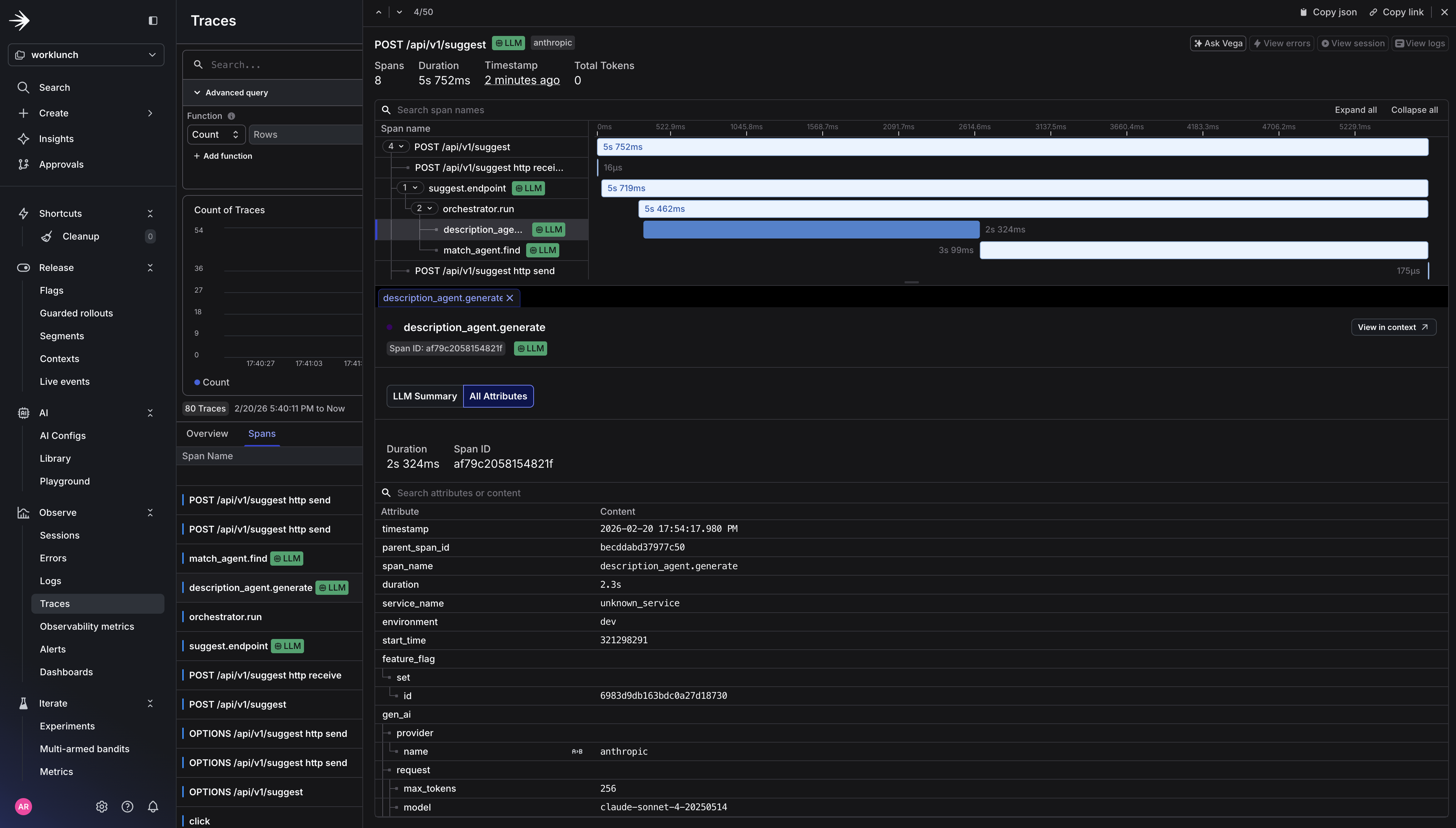
Now if we rerun our application, we should see LaunchDarkly Traces capturing the Otel spans.
$docker compose up --build
$npm run web # in a separate terminal

LaunchDarkly traces UI

LaunchDarkly traces UI showing the instrumented spans.

How LaunchDarkly processes OTel traces

LaunchDarkly receives traces for logging and converts OTel span data into events for use with Experimentation and Guarded Rollouts. The process works like this:

  1. Your application emits a span that covers an HTTP request (or LLM call). This span carries standard HTTP attributes: http.response.status_code, http.route, latency derived from span duration.
  2. On that same span (or a parent span in the same trace), you’ve emitted a feature_flag span event with feature_flag.key and feature_flag.variant.
  3. LaunchDarkly’s collector ingests the trace and looks for HTTP spans that overlap with spans containing at least one feature_flag event. When it finds a match, it produces a metric event associating the flag variant with the observed latency and error rate (5xx status codes).
  4. Those metric events flow into Experimentation, where they become the outcome metrics for your flag-controlled A/B test — for example, comparing claude-sonnet-4-20250514 vs claude-haiku-4-5-20251001 on p95 latency and error rate without writing a single line of custom metric instrumentation.

Every span in the agent chain is nested under a single trace. The collector fans out that trace to both backends simultaneously. Langfuse gets the full LLM details for prompt debugging and cost analysis. LaunchDarkly gets the flag-correlated signal it needs for automated rollout decisions.

Key attributes from gen_ai trace spans
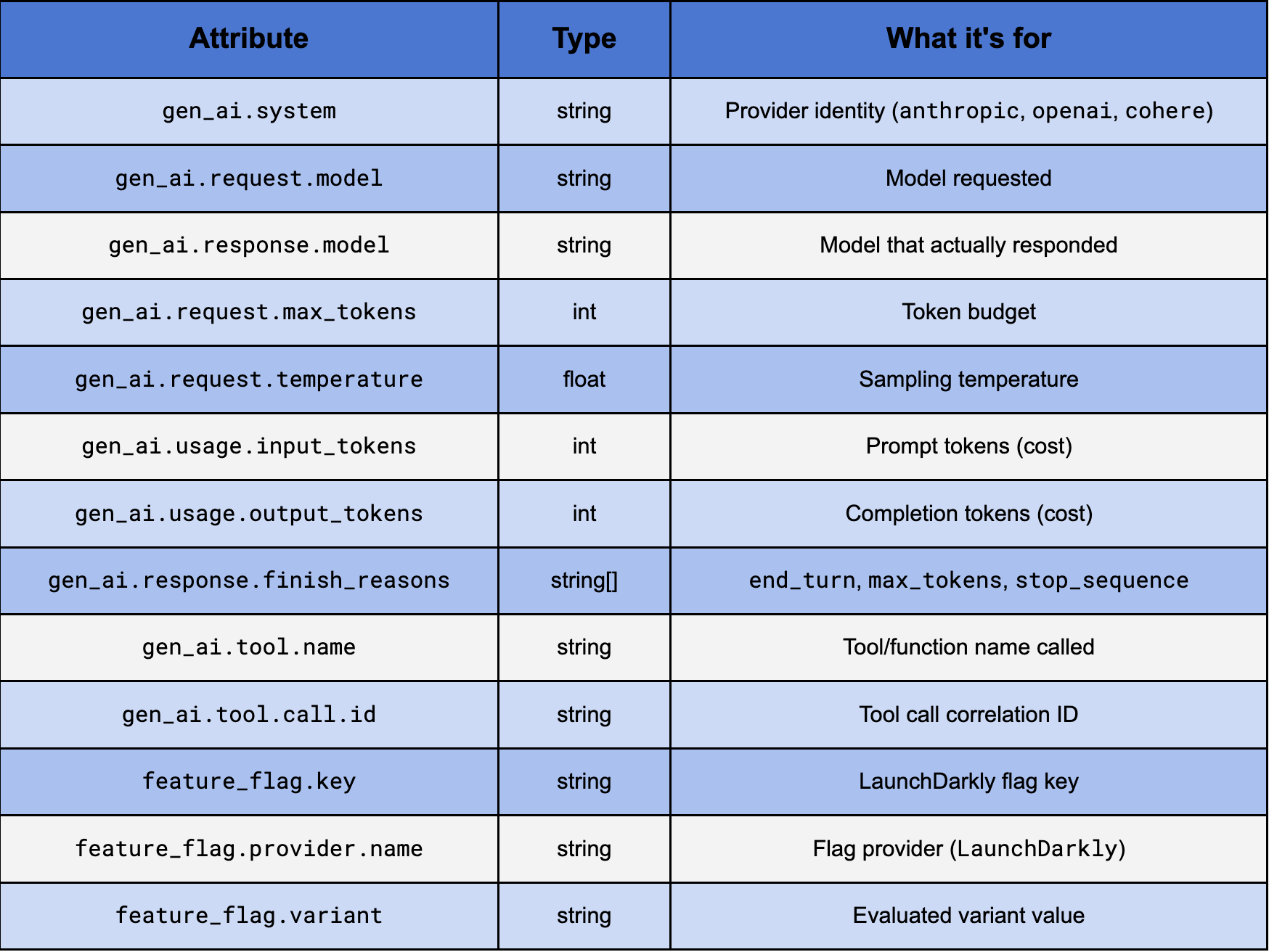
Key attributes from gen_ai trace spans

Key attributes from gen_ai trace spans.

Step 3: Trigger a guarded rollout

With traces flowing into LaunchDarkly and span events carrying your flag evaluations, you can now configure a Guarded Rollout that automatically rolls back the AI Suggest feature if token costs spike or response truncation increases as you increase the percentage of users who see it.

In the LaunchDarkly UI, navigate to your flag (ai-suggest-enabled), under Default rule click Edit and select Guarded Rollout.

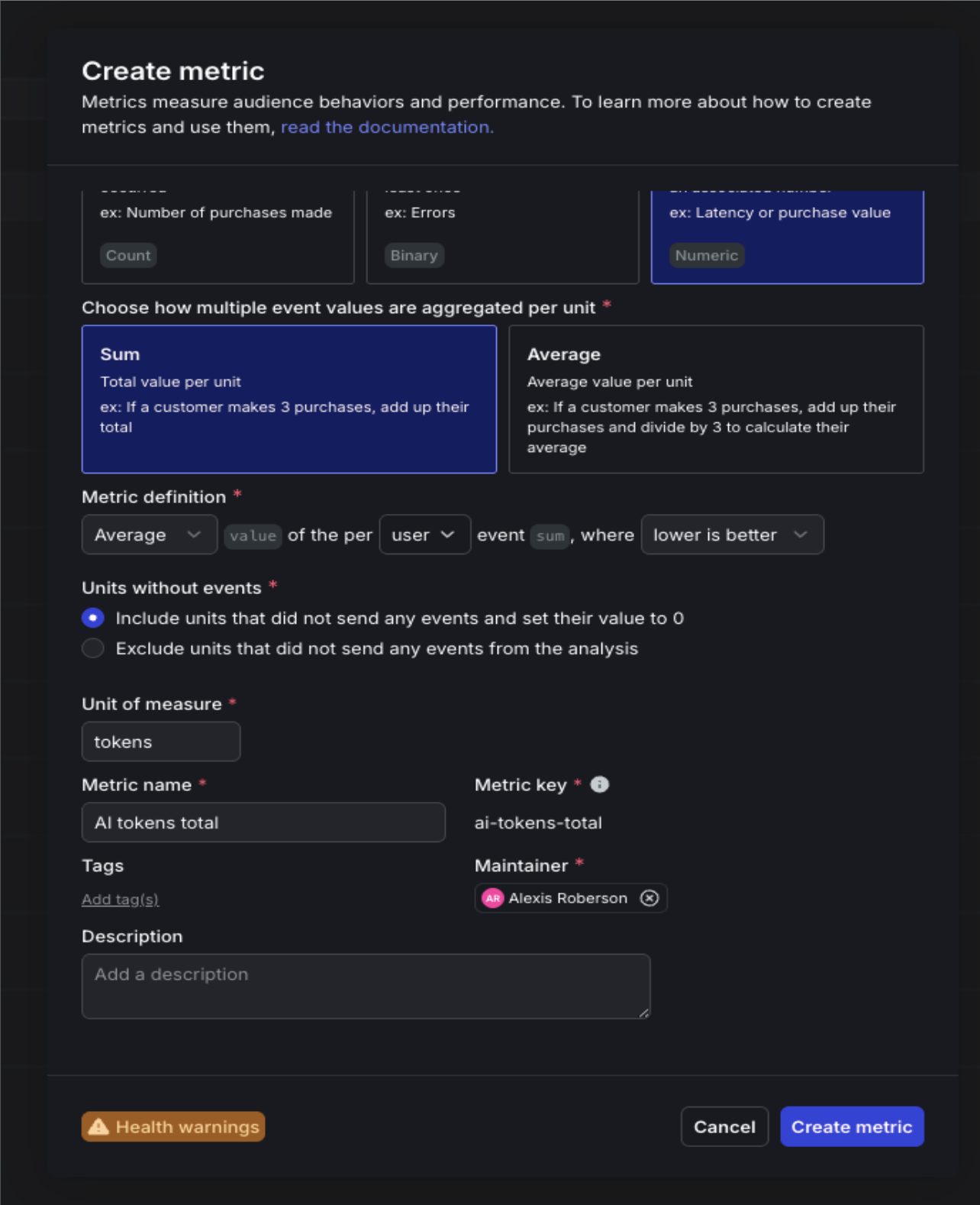
You’ll need to create two new custom metrics to attach to the guarded rollout. The first will is the AI tokens total rollout metric. This will measure cost-per-request as a gate for releasing the feature to a wider audience and alert if average tokens per request exceeds your baseline by more than 25%. And the second is AI completion truncated error metric, which will catch prompt truncation before users notice degraded output quality. This metric will halt the rollout if the rate climbs above your control baseline.

For ai.tokens.total:

  • Event kind: Custom
  • Event key: ai.tokens.total
  • What do you want to measure?: Value / Size (Numeric) — you’re passing the actual token count as the magnitude
  • Metric name: AI tokens total

AI tokens total metric

Creating the AI tokens total metric in LaunchDarkly.

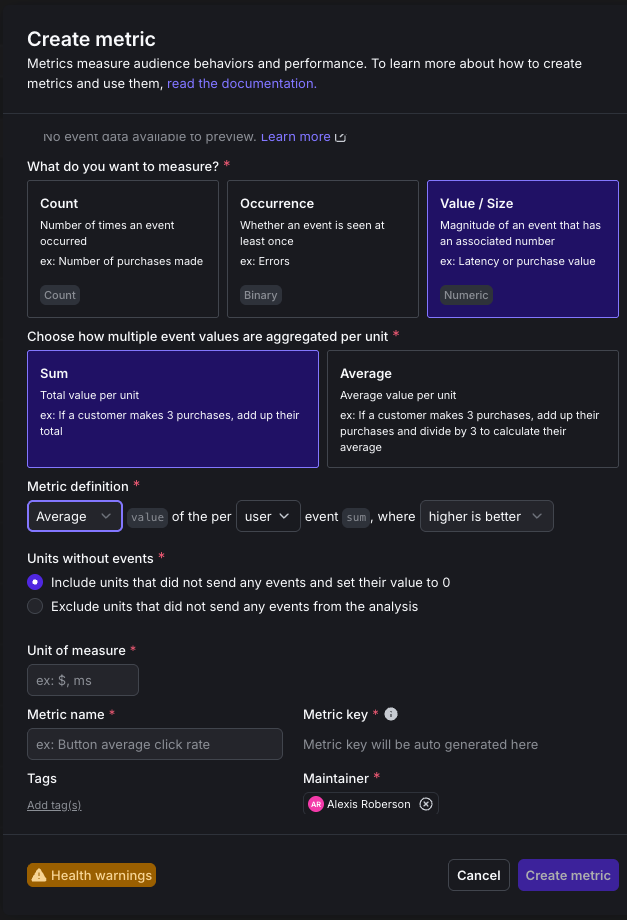
For ai.completion.truncated:

  • Event kind: Custom
  • Event key: ai.completion.truncated
  • What do you want to measure?: Occurrence (Binary) — you’re tracking whether truncation happened at least once, not how many times
  • Metric name: AI completion truncated

AI completion truncated metric

Creating the AI completion truncated metric in LaunchDarkly.

Select the two newly created metrics.
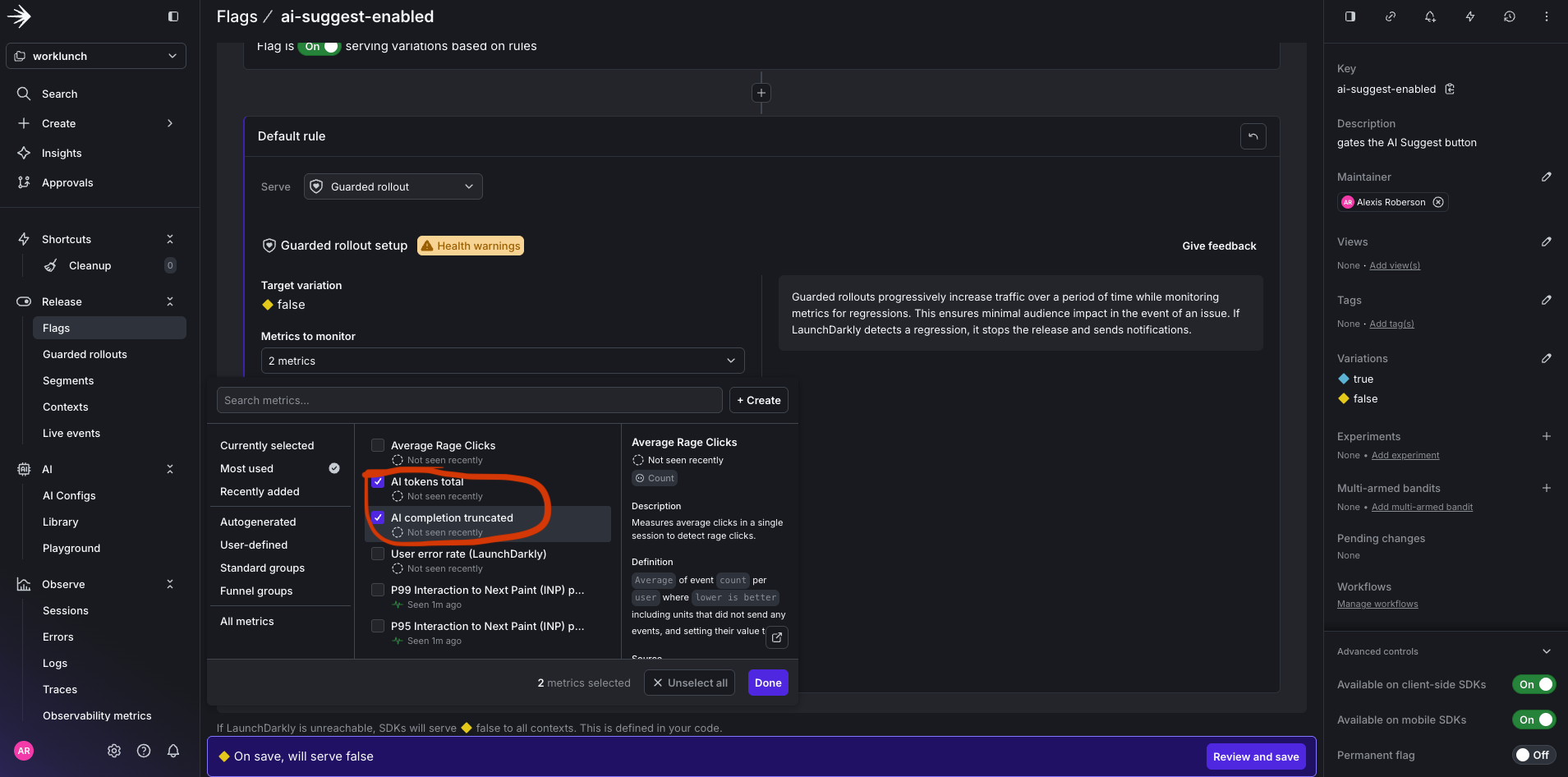
Select both GR metrics

Selecting both Guarded Rollout metrics.

Set the threshold to 25 percent for 1 week.
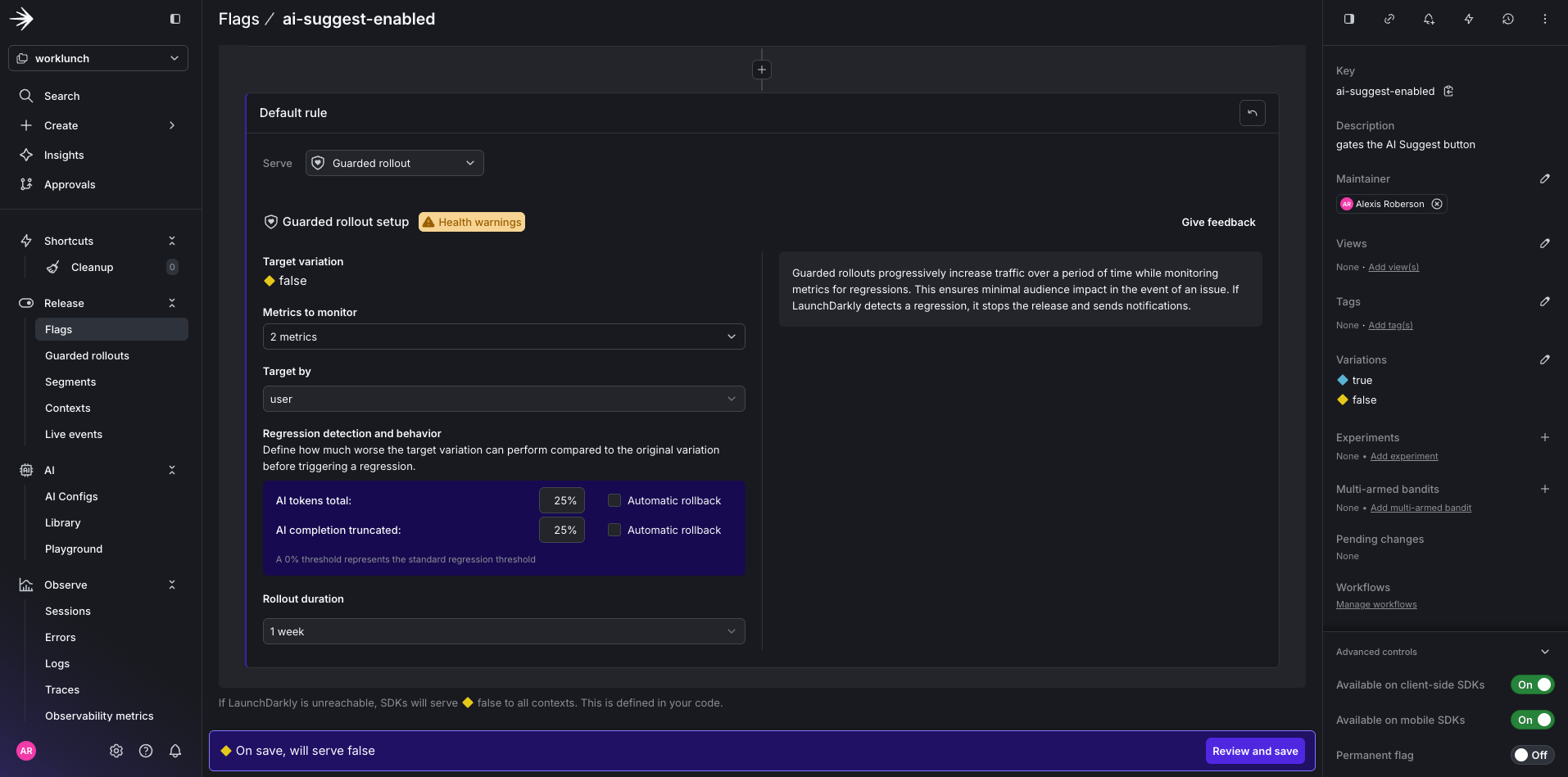
GR threshold and duration

Setting the Guarded Rollout threshold and duration.

Click Save.

Running GR for ai-suggest flag

The running Guarded Rollout for the ai-suggest-enabled flag.

LaunchDarkly will now monitor both metrics against the ai-suggest-enabled flag and trigger an automatic rollback if either threshold is breached.

What You’ve Built

At this point you have a fully instrumented LLM application where every layer of the stack tells a story. The FastAPI route evaluates a LaunchDarkly flag and stamps the result onto the trace. The orchestrator creates a parent span that ties the entire agent chain together. Each agent makes a Claude API call and records exactly what was sent, what came back, and how many tokens it cost. The OTel Collector fans all of that out to two backends simultaneously without a single line of application code changing between them.

Langfuse gives you the LLM-specific view: prompt content, completions, token usage, and latency per agent so you can debug why a description came out wrong or whether the match agent is consistently burning more tokens than expected. LaunchDarkly gives you the experimentation view: which model variant was active during a given request, how latency and error rates compare between claude-sonnet-4-20250514 and claude-haiku, and the automated safety net to roll back if a new variant starts degrading your users’ experience. Both tools are consuming the same trace. Neither required a custom integration.

Conclusion

LLM applications fail in ways that traditional monitoring wasn’t designed to catch. OpenTelemetry gives you the standard schema to do that, and the collector architecture gives you the flexibility to route that signal wherever it’s most useful.

If you’re building anything with LLMs in production, start here. Instrument at the agent level, follow the GenAI semantic conventions, and build your observability pipeline before you need it.

The full source code for the WorkLunch app is available here. Clone it, swap in your API keys, and you’ll have a working multi-agent trace pipeline running locally in under ten minutes.

Additional resources