
Migrate a hardcoded LangGraph agent to LaunchDarkly AgentControl in 20 minutes
Published April 20, 2026

In this tutorial you’ll run a small LangGraph agent locally, then migrate its hardcoded prompts, model choice, and tools into AgentControl. After the migration, every prompt tweak, model swap, or tool change ships as a LaunchDarkly update instead of a code deploy. The migration takes about 20 minutes.
When you finish, the codebase will:
- Pull its system prompt, model name, and parameters from a config on every request.
- Load its Tavily search tool definition from the same Config instead of a hardcoded module-level list.
- Emit duration, token, success, and error metrics to LaunchDarkly on each user turn.
- Have one offline-eval dataset staged for pre-rollout regression testing in the LaunchDarkly Playground.
- Fail gracefully by falling back to the original hardcoded values if LaunchDarkly is unreachable.
- Run A/B tests on models, prompts, parameters, and tool sets by creating variations and targeting them at user segments.
Tutorial summary
The agent you’ll run is the official langchain-ai/react-agent template: a single-node React agent that uses Claude Sonnet and a Tavily search tool. The migration will pull three files into LaunchDarkly:
- The prompt in
prompts.py, - The model name in
context.py, and - the tool list in
tools.py.
The migrate agent skill completes the work in five stages (audit, wrap, move tools, instrument, and attach evaluators). It pauses at the end of each stage for you to review.
The provider call and the routing logic stay where they are. react-agent is one LLM that decides, one ToolNode that runs the tools the LLM asks for, and one conditional edge that loops between them. When you add a second agent with a handoff, you move the topology into a LaunchDarkly Agent Graph.
This is a reviewer’s workflow, not a coding exercise. You ask your agent to run the migrate skill, then read the diffs and verify the skill got the audit, fallback, and tool schemas right. Every code sample below is an example of what your agent should produce, not something you should copy and paste.
If you’d rather compare your migration to a finished one, the aiconfig-migrate branch of launchdarkly-labs/react-agent is the reference end state for this tutorial: the five stages applied against the upstream template, with config-driven model, prompt, and tool wiring already in place.
Prerequisites
You’ll need:
- Python 3.11 or higher with
uv - A LaunchDarkly account with an AI project and access to an active LaunchDarkly SDK key
- An Anthropic API key for Claude Sonnet
- A Tavily API key for the search tool
- Claude Code (or another Claude Agent SDK client) with the LaunchDarkly agent skills installed and the LaunchDarkly MCP server configured. If you haven’t used skills before, the agent skills quickstart completes the setup in under 10 minutes.
Clone the hardcoded starting point
Specify an ANTHROPIC_API_KEY and TAVILY_API_KEY in .env.
Then identify what’s hardcoded. The migrate skill’s first step is a read-only audit. Knowing the shape from the beginning makes the audit output easier to read. Here’s a table of the hardcoded values in react-agent:
Skill stage 1: Audit the hardcoded values
Open Claude Code inside the cloned repo and run:
The skill starts by performing a read-only audit. It scans for hardcoded model and prompt values, identifies your package manager and provider, and produces a structured summary. For react-agent the summary will look similar to this example:
The skill stops here. Reply “continue” (or whatever affirmative response is appropriate for your shape) to begin Stage 2.
If your audit output doesn’t match this, don’t continue without making improvements. The skill is designed to adapt. Read what it produces, reconcile that output against the table in Step 1, and tell the skill where it’s wrong. Iterate until the audit output addresses all the hardcoded values in the table.
Skill stage 2: Wrap the call in the AI SDK
This is the first stage where the skill writes code. It installs the SDK, creates the config in LaunchDarkly, rewrites the hardcoded prompt to Mustache syntax, and adds a new ld_client.py module. To read the finished file, visit ld_client.py.
Three things to check in the diff:
- The fallback mirrors the audit exactly. Every value you captured in Step 1 appears in
FALLBACKwith the same model name, provider, instruction text, and knob values. A drifted fallback silently changes behavior when LaunchDarkly is unreachable.max_search_resultsbelongs inModelConfig(custom={...}), notparameters={...}.parametersis forwarded to the provider SDK, and Anthropic, OpenAI, and Gemini all reject unknown kwargs. - Model construction goes through
create_langchain_model(ai_config), not a hand-rolledinit_chat_modelorload_chat_modelwrapper. Hand-rolled builders only pass the model name, so variation parameters such astemperature,max_tokens, andtop_psilently drop. If the template’sutils.load_chat_modelis still present, have the skill delete it. {{ system_time }}interpolation goes through the SDK, not a manual.replace(). The fourth argument toagent_config(...)is{"system_time": system_time}. If you see.replace("{{ system_time }}", ...)at the call site, the skill missed the built-in interpolation.
Verify both paths run before continuing. The skill won’t move to Stage 3 until both work. Here’s how to do that:
In one terminal, start the dev server with your SDK key:
In a second terminal, invoke the graph once via the local API:
A natural-language answer should appear. To make the LaunchDarkly-served path visually distinct from the fallback path, open the react-agent config in LaunchDarkly, edit the default variation’s instructions, and append a sentence like:
Always respond in over-the-top 1980s slang. Use words like “totally,” “rad,” “gnarly,” and “tubular.” Drop a “righteous!” somewhere.
Save the variation, then re-run the curl command. Within a few seconds you should see the answer come back with added 80s slang. That’s proof the LaunchDarkly-served prompt is winning over the hardcoded fallback.
Next, stop the server, unset LD_SDK_KEY, restart it, and run the same curl call again. The slang should disappear and the answer should read in the original neutral voice. That’s proof the fallback, which still follows the pre-migration prompt exactly, runs when LaunchDarkly is unreachable.
If you’d rather click through a chat UI, LangGraph Studio (free LangSmith login) and the hosted Agent Chat UI (point it at http://127.0.0.1:2024 with the graph id agent) both work against the same local server.
Skill stage 3: Move the tool into the config
Stage 3 attaches the tool schema to the LaunchDarkly variation and rewires graph.py and tools.py to read the tool list from the config using the skill’s tool factory pattern. Each tool is built by a factory that takes the per-run ai_config and returns a closure. The closure captures max_search_results, or any other model.custom knob, one time at the start of the turn, so the tool body never re-evaluates the config. For the finished shape, visit tools.py and graph.py.
The pattern, drawn verbatim from the reference repo:
graph.py materializes the factories inside call_model’s first-tick branch: built = {name: factory(ai_config) for name, factory in TOOL_FACTORIES.items()}, then update["tools"] = build_structured_tools(ai_config, built). Subsequent ticks read state.tools and pass it to create_langchain_model(ai_config).bind_tools(tools). For an exact sample, visit graph.py:50-63.
Verify three things:
- The registry exports
TOOL_FACTORIESand not a plainTOOL_REGISTRYof callables, - Each factory returns a closure that reads
model.customvalues at construction time, not from inside the tool body, and bind_toolsreads the materialized tool list off state instead of referencing the registry directly.build_structured_toolsfromldai_langchain.langchain_helperwraps each built callable as a LangChainStructuredToolwith the LaunchDarkly-served schema.
Reading ai_config.model.get_custom(...) from inside a tool body fires get_agent_config() on every tool invocation, inflating $ld:ai:agent_config event counts proportional to tool-call volume and letting a mid-turn flag change swap max_search_results between the first and second tool call. The factory captures the value one time at the start of the turn, preserves turn-level atomicity, and keeps agent_config evaluations at one per turn.
Skill stage 4: Wire the tracker
This is the stage where the graph topology changes. The migration adds a finalize node so every metric event for a user turn shares one runId, the unit LaunchDarkly bills and groups by in the Monitoring tab. A React agent turn loops through call_model several times to pick a tool, execute, and summarize. The at-most-once events, such as duration, tokens, success, and error, fire one time across that whole loop, not one time per tick.
The three things to understand:
- Run-scoped state. On the first
call_modeltick of a turn, the migration resolves the config, mints one tracker withai_config.create_tracker(), materializes the tool factories into concrete callables, starts aperf_counter_nstimer, and stashes all of it on state. Every subsequent tick reuses what’s on state. The same tracker uses the samerunIdand results appear in one row per turn in Monitoring. - Per-step events stay in
call_model.tracker.track_tool_calls(...)is explicitly not at-most-once. It runs every tick the LLM dispatches tools. Token usage accumulates intoAnnotated[int, add]state fields across ticks. - Run-level events move to a new
finalizenode.track_duration,track_tokens,track_success, andtrack_errorall fire there, one time per turn, reading totals off state.
Read state.py for the run-scoped fields (ai_config, tracker, tools, start_perf_ns, three token counters, errored) and graph.py for the lazy-init prelude in call_model, the finalize node, and other details.
ai_config.create_tracker() is a factory method as of launchdarkly-server-sdk-ai 0.18.0. If your skill emits ai_config.tracker instead of ai_config.create_tracker, regenerate. This migration workflow uses get_ai_usage_from_response rather than get_ai_metrics_from_response so the graph can accumulate tokens across ticks into state fields rather than tracking them synchronously per-call.
Test this yourself by sending one request through the graph, then opening the config in LaunchDarkly and reviewing the Monitoring tab. Within one or two minutes you should see one row per user question with non-zero duration and token counts. If the tab fills up with multiple rows per question, the skill minted a tracker inside call_model instead of threading one through state.
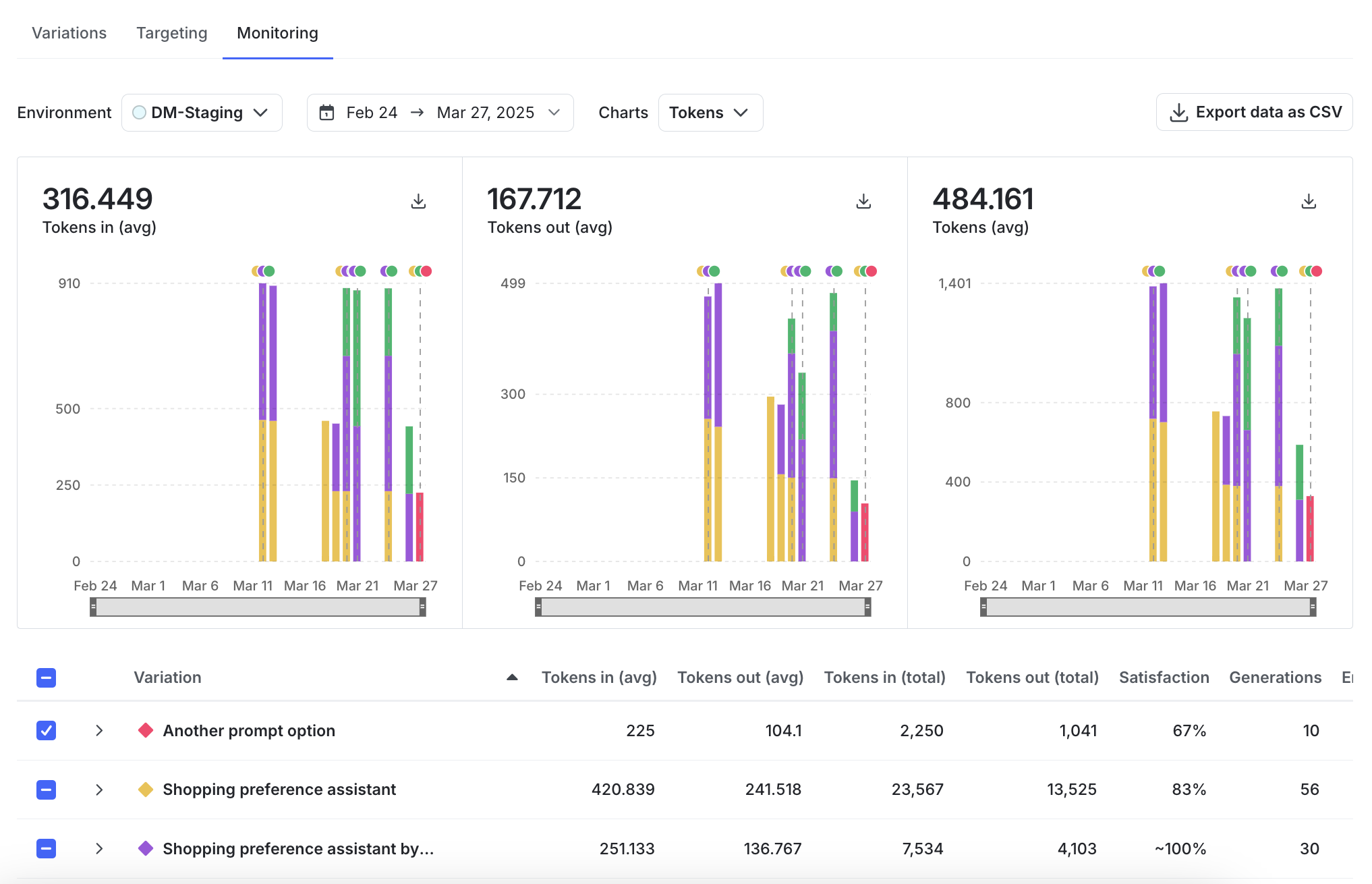
This repo collapses the setup steps of resolving the config, minting the tracker, and building the tools into the first tick of call_model instead of a dedicated setup_run node. It also skips track_metrics_of_async around ainvoke, which would fire duration and success per call rather than per turn. This helps produce a legible code diff, but production code should follow the skill’s setup_run and finalize factoring.
If your app has a thumbs-up/down UI, the skill will also wire tracker.track_feedback(...). Feedback usually arrives in a later request from a different process, so pass tracker.resumption_token out to your frontend at call time and rebuild the tracker with LDAIClient.create_tracker(token, context) in the feedback handler. react-agent doesn’t have a feedback UI, so we’ve intentionally skipped this step.
Keep going
The migration is done. The payoff is what you can do next without another code deploy:
- Reference implementation. Diff your own run against
launchdarkly-labs/react-agenton theaiconfig-migratebranch to validate fallback shape, tool wiring, and tracker placement. - Regression-test before rollout. Agent-mode Configs don’t support UI-attached automatic judges, so run an offline evaluation against a fixed dataset. The skill generates a starter
datasets/react-agent-tests.csvfrom your audit; take it to the Offline Evaluation of RAG-Grounded Answers tutorial. The Accuracy judge at threshold 0.85, on a different model family than the agent, is the right starting point. - Zero-code changes in production. Swap models per cohort, A/B test prompts or tool sets on 50/50 traffic, disable a tool for a segment, or watch duration, token spend, and eval scores land in the Monitoring tab in real time. All from the LaunchDarkly UI.
- Scale to a second agent. The moment you add a supervisor plus specialists or any routing handoff, move the topology itself into LaunchDarkly via
ai_client.agent_graph("key", ld_context). The Beyond n8n tutorial walks the full pattern, andlaunchdarkly-labs/devrel-agents-tutorial(agent-skills branch) is the production-grade reference with three agents, per-user targeting, and dynamic routing.