
Building a data extraction pipeline with LaunchDarkly
Published January 9, 2026

This tutorial was published in January 2026, before LaunchDarkly shipped several features that extend the extraction-pipeline pattern shown below. The walkthrough still works, but for new builds you may also want to use:
- Prompt snippets: Reusable prompt fragments so you can share schema definitions across configs without copy-paste drift
- Offline evaluations and Datasets: Validate every prompt or schema change against a saved reference set of transcripts before promoting
- Custom judges: Score the structured outputs against domain-specific quality criteria, such as field completeness or schema adherence
To learn more, read AgentControl.
Every conversation contains signals your ML models need. Customer calls reveal buying intent. Support tickets expose product friction. Interview transcripts capture technical depth. The problem? Those signals are buried in thousands of words of unstructured text.
This tutorial shows you how to build a data extraction pipeline that turns messy transcripts into structured JSON - using AgentControl to control everything (models, prompts, schemas) without redeploying.
What you’ll build: A pipeline that extracts 40-60+ structured fields from any transcript - sentiment scores, engagement metrics, binary signals, text statistics - all instantly configurable through LaunchDarkly’s UI.
The key insight: When you discover that customer_question_count predicts engagement better than talk time, or that Opus 4.5 handles technical jargon better than GPT-5.2, you can update your extraction logic immediately. No PR, no deploy, no waiting.
Ready to build? Clone the complete example repository to start extracting structured data from your transcripts in minutes.
The problem with unstructured text
Your organization has valuable signals buried in text such as customer conversations, support tickets, interview transcripts, product reviews. Tools like Gong, Chorus, and conversation intelligence platforms are excellent for their designed purpose, but you need something different: extracting specific features for your ML models, with a schema you control completely.
What you typically have:
What your models need:
How the pieces fit together
The AI model automatically selects the most appropriate extraction schema (prospecting, discovery, demo, proposal, technical, or customer success) based on the transcript content.
What stays in LaunchDarkly:
- Model selection (GPT-5.2, Opus 4.5, Gemini 3)
- System and user prompts
- All 6 extraction tool schemas (40-60+ fields each)
- Temperature and other parameters
- Intelligent tool selection logic
- Targeting rules for different use cases
What stays in your code:
- Reading input files
- Passing transcript text
- Writing output CSV/JSON
Why this approach
Change schemas in 2 minutes, not 2 sprints
This separation matters when you discover issues in production. For example, if the AI model is selecting the wrong tool for certain transcript types, you can instantly adjust the prompt or model using LaunchDarkly - takes 2 minutes in the UI instead of a hotfix deploy.
Key benefits:
- Instant schema updates: Add fields to any of the 6 tools when you discover new predictive signals
- A/B testing models: Test Google Gemini 3 vs Anthropic Claude Opus 4.5 to see which selects tools more accurately
- Smart tool selection: AI model automatically chooses between prospecting, discovery, demo, proposal, technical, or customer success schemas
- Privacy compliance: Different configurations for different regions using targeting rules - GDPR-compliant schemas for European customers
One gateway, all the models
Vercel brings specific advantages for data extraction workloads:
- Server-sent events for real-time progress: Processing 1,000 transcripts? Stream progress updates to your UI as each completes using the Vercel AI SDK
- Automatic scaling: From 1 transcript to 10,000 - Vercel functions scale without configuration
- Built-in reliability: Automatic retries and failover when LLM providers have issues
- OIDC tokens on deployment: No API keys in production - Vercel handles auth automatically
- Unified LLM access: One endpoint for OpenAI GPT-5.2, Anthropic Claude Opus 4.5, and Google Gemini 3 models through Vercel AI Gateway
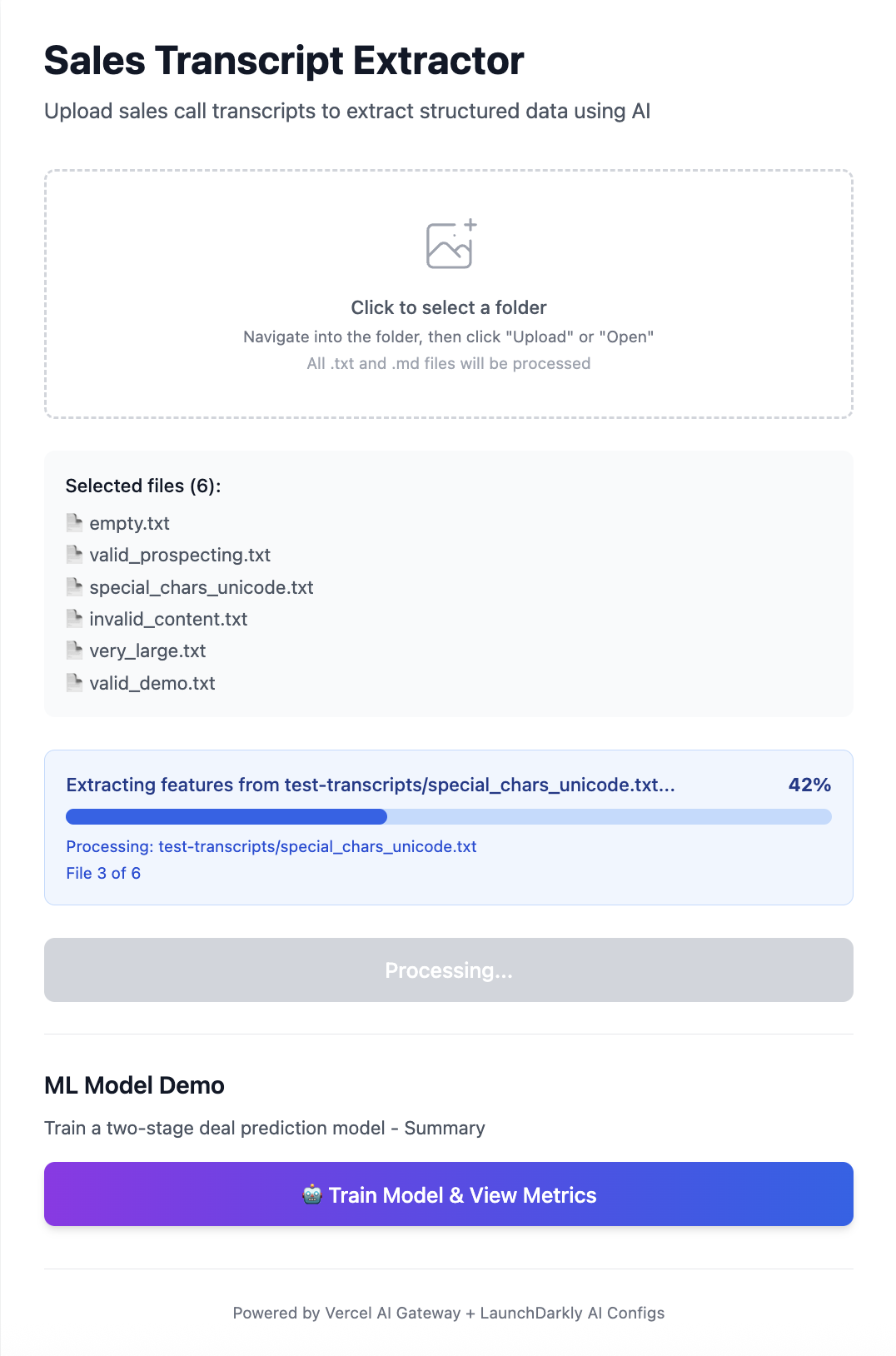
Deploy once, then tune everything through LaunchDarkly while Vercel handles the infrastructure.
Complete setup
Prerequisites
- Node.js 18+ and basic TypeScript knowledge
- LaunchDarkly account with AgentControl enabled (quickstart guide)
- Vercel account (free tier works) or API keys for local development
- 100+ transcripts or documents to process (any format)
Quick start
Clone the complete example to skip setup and start extracting immediately:
Install dependencies
SDK Documentation: LaunchDarkly Node.js AI SDK with Vercel provider provides complete reference for all SDK features.
For ML model training (optional), set up a Python environment:
Note: For Python-based pipelines, see the LaunchDarkly Python AI SDK (doesn’t include Vercel provider).
Configure environment
Environment variables explained:
LAUNCHDARKLY_SDK_KEY: Runtime SDK key for feature flagsAI_GATEWAY_API_KEY: Required for Vercel deploymentsVERCEL_OIDC_TOKEN: Auto-generated for local development vianpx vercel env pullLD_API_KEY&LD_PROJECT_KEY: Only for bootstrap script to create configs
Project structure
configuration
Where the extraction schemas live
The field definitions and extraction schemas are stored in two key locations:
-
LAUNCHDARKLY_TOOLS.json- Contains all field schemas:- 40 core fields shared across all tools (sentiment scores, engagement metrics, etc.)
- Tool-specific fields for each document type
- This file defines what data you’ll extract
-
bootstrap/create_unified_config.py- Sets up LaunchDarkly:- Reads the schemas from
LAUNCHDARKLY_TOOLS.json - Creates the config in LaunchDarkly named
transcript-extraction-unified - Attaches all 6 extraction tools to this single config
- Run once:
python bootstrap/create_unified_config.py
- Reads the schemas from
The 6 extraction tools
Each tool is defined in LAUNCHDARKLY_TOOLS.json with specific fields for different call types:
Prospecting tool (extract_prospecting_features - 43 fields)
- Where it’s defined:
LAUNCHDARKLY_TOOLS.json→variation_a_prospecting - Use case: First contact, cold outreach, gatekeeper conversations
- Example fields:
gatekeeper_encountered,callback_scheduled,interest_level
Discovery tool (extract_discovery_features - 48 fields)
- Where it’s defined:
LAUNCHDARKLY_TOOLS.json→variation_b_discovery - Use case: Qualification calls, needs assessment
- Example fields:
budget_confirmed,authority_level,qualification_score
Demo tool (extract_demo_features - 58 fields)
- Where it’s defined:
LAUNCHDARKLY_TOOLS.json→variation_c_demo - Use case: Product demonstrations, feature walkthroughs
- Example fields:
customer_wow_moments,demo_effectiveness_score,trial_requested
Proposal tool (extract_proposal_features - 53 fields)
- Where it’s defined:
LAUNCHDARKLY_TOOLS.json→variation_d_proposal - Use case: Pricing discussions, contract negotiations
- Example fields:
close_probability,discount_requested,blockers_to_close
Technical tool (extract_technical_features - 63 fields)
- Where it’s defined:
LAUNCHDARKLY_TOOLS.json→variation_e_technical - Use case: Architecture reviews, technical deep-dives
- Example fields:
technical_fit_score,technical_risk_score,scalability_concerns
Customer Success tool (extract_customer_success_features - 53 fields)
- Where it’s defined:
LAUNCHDARKLY_TOOLS.json→variation_f_customer_success - Use case: QBRs, renewal discussions, expansion opportunities
- Example fields:
account_health_score,renewal_likelihood,churn_risk
ML Preview: These extracted fields become features for predictive models - Part 2 will show you how to train models that predict deal outcomes, customer churn, and more using the data you extract here.
How to customize the schemas
You have two options for customizing your extraction schemas:
Option 1: Edit directly in LaunchDarkly UI
- Navigate to LaunchDarkly → AgentControl →
transcript-extraction-unified - Click on any tool (e.g., “Extract Prospecting Features”)
- Edit the JSON schema directly in the UI - add/remove fields instantly
- Save changes - they apply immediately, no deployment needed!
This is perfect for quick iterations - discover a new predictive signal? Add it in 30 seconds.
Option 2: Update via code
- Edit
LAUNCHDARKLY_TOOLS.json:
- Re-run bootstrap to update LaunchDarkly:
- Your extraction automatically uses the new schema - no code changes needed!
Start with 100 transcripts to validate your tools. You’ll likely learn more from the first 100 extractions than weeks of planning. Watch which tools the AI model selects and refine the prompts if it’s choosing incorrectly.
Implementation & usage
Core implementation
Here’s the extraction implementation:
How to run the extraction pipeline
Once your schemas are configured, running extraction is straightforward:
The AI model automatically selects the right extraction tool based on the transcript content.
Beyond sales calls - what else you can extract
This architecture works for any unstructured data extraction need. The pipeline code never changes - just the configuration.
Support ticket analysis
- Extract urgency scores, issue categories, product areas, customer effort scores
- Route urgent tickets to detailed schemas, low-priority to streamlined ones
- ML applications: Predict escalation likelihood, estimate resolution time, auto-assign to right team, identify product bugs from patterns
Customer review mining
- Pull out feature mentions with sentiment, competitor comparisons, recommendation likelihood
- Different product lines can use different configs with tailored extraction tools
- ML applications: Predict NPS scores, identify feature requests, forecast churn from negative patterns, cluster customers by satisfaction drivers
Interview transcript processing
- Extract technical competency signals, communication clarity, culture fit indicators
- Different roles need different schemas - handle this through LaunchDarkly targeting rules
- ML applications: Predict candidate success probability, identify skill gaps, score cultural alignment, reduce hiring bias through standardized signals
Medical consultation transcripts
- Extract symptoms, treatment discussions, medication mentions, follow-up requirements
- Ensure HIPAA compliance by redacting PII before extraction
- ML applications: Predict readmission risk, identify medication adherence issues, flag potential diagnoses for review, optimize appointment scheduling
Legal document analysis
- Extract contract terms, risk clauses, obligations, and deadlines
- Route different document types (NDAs, MSAs, employment contracts) to specialized schemas
- ML applications: Assess contract risk scores, identify non-standard terms, predict negotiation outcomes, flag compliance issues
Earnings call transcripts
- Extract forward-looking statements, financial metrics, competitive positioning
- Capture management sentiment and guidance changes
- ML applications: Predict stock price movements, identify leadership confidence levels, detect financial health indicators, compare guidance to historical accuracy
Privacy and sensitive data
- Add PII detection step before extraction - scan for emails, phone numbers, SSNs, names
- Either redact ([REDACTED]) or skip extraction based on compliance requirements
- ML applications: Route by geography using LaunchDarkly targeting - EU transcripts use privacy-safe schemas, other regions get full extraction
When to use this approach
Use this when:
- Processing 100-10,000 documents monthly
- Schema needs frequent iteration
- Different document types need different treatment
- You’re bootstrapping training data
Skip this when:
- Processing millions of documents (use traditional NLP)
- Schema is fixed and proven
- You need sub-second latency
- Documents follow strict templates
What’s next
In Part 2, I’ll show how to use these extracted features for ML models. The challenge: sparse outcomes (most deals don’t close, most candidates aren’t hired). I’ll demonstrate a zero-inflated regression approach that actually works with real-world data.
Ready to build? Start with your messiest transcripts - that’s where you’ll learn what features really matter.
Further reading
- CI/CD for AgentControl - Automate config deployments with version control
- Multi-agent systems with LangGraph - Build complex AI workflows
- Smart AI Agent Targeting with MCP Tools - Route extraction jobs to different schemas by user segment or geography
- Evaluate LLM code generation with LLM-as-judge evaluators - Custom judges for grading specialized outputs
- Build AgentControl configs with Agent Skills - Spin up new extraction configs from your coding assistant