Traffic reshuffling
This topic explains how LaunchDarkly assigns or reassigns contexts to flag variations when you make changes to an experiment. When you make certain edits to an experiment, such as adding additional metrics or increasing traffic, LaunchDarkly creates a new iteration of that experiment.
When LaunchDarkly creates a new iteration, you can either allow or disable traffic reshuffling:
-
Allow traffic reshuffling: This option lets LaunchDarkly assign contexts to new variations when you start a new experiment iteration. For example, if LaunchDarkly assigns user context
Annato the “blue button” variation in the first iteration of an experiment, LaunchDarkly reassignsAnnato the “red button” variation of the experiment in the next iteration. This option is useful for when you want to keep the number of contexts evenly allocated between different variations. -
Disable traffic reshuffling: This option forces LaunchDarkly to keep contexts assigned to their original variation across iterations. For example, if LaunchDarkly assigns user context
Annato the “blue button” variation in the first iteration of an experiment, LaunchDarkly will always assignAnnato the “blue button” variation in subsequent iterations. This option is useful when you want to keep user experience consistent for the full duration of an experiment. This is the default setting when you create an experiment.
How LaunchDarkly assigns contexts to variations
Whether LaunchDarkly can preserve a context’s variation across iterations depends on how it initially assigns contexts to variations.
When you start an experiment iteration, LaunchDarkly generates a seed for that iteration. To assign a context to a variation, LaunchDarkly combines the seed with the context’s key, hashes the result, and maps the hash to one of 100,000 buckets. Each bucket belongs to one variation, so every context in a given bucket receives that variation. As long as the seed stays the same, a context always maps to the same bucket, and therefore always receives the same variation.
Buckets that are not part of the experiment audience are “untracked.” When you increase the amount of traffic in your experiment, LaunchDarkly draws from untracked buckets first, which is why the contexts already in your experiment keep their variations. If there are not enough untracked buckets remaining to cover the increase, and you allow traffic reshuffling, LaunchDarkly generates a new seed for the iteration. A new seed maps every context to a new bucket, which reassigns contexts across all of the variations. If you disable traffic reshuffling, LaunchDarkly does not generate a new seed.
Experiments in a layer work differently, because all of the experiments in a layer share one seed. Rather than generating a new seed, LaunchDarkly reshuffles a layer experiment by redistributing which buckets belong to which variation. This reshuffles the contexts in that experiment while leaving the shared seed intact, so the other experiments in the layer keep their traffic. To learn more, read Traffic assignment in layers.
Allow or disable reshuffling
You can decide whether to allow or disable reshuffling when you create an experiment.
To allow or disable traffic reshuffling for a new or existing experiment, navigate to the experiment’s Design tab. In the “Audience allocation” section, check or uncheck the Disable reshuffling box. By default, LaunchDarkly does not reshuffle experiment traffic when you start a new iteration.
This setting only preserves assignments when you increase traffic. For example, increasing traffic from 5% to 20%, then from 20% to 60%, preserves existing assignments. If you decrease traffic and then increase it again, such as from 20% to 5%, then from 5% to 60%, LaunchDarkly may reassign contexts to different variations.
Checking the Disable reshuffling box prevents traffic reshuffling only if you make changes to an experiment using the experiment’s Edit design button. If you use the Stop button instead, LaunchDarkly will always reshuffle traffic into new variations when you start a new iteration, whether or not the Disable reshuffling box is checked.
Example of an experiment with traffic reshuffling disabled
In this example, you are running an experiment with traffic reshuffling disabled.
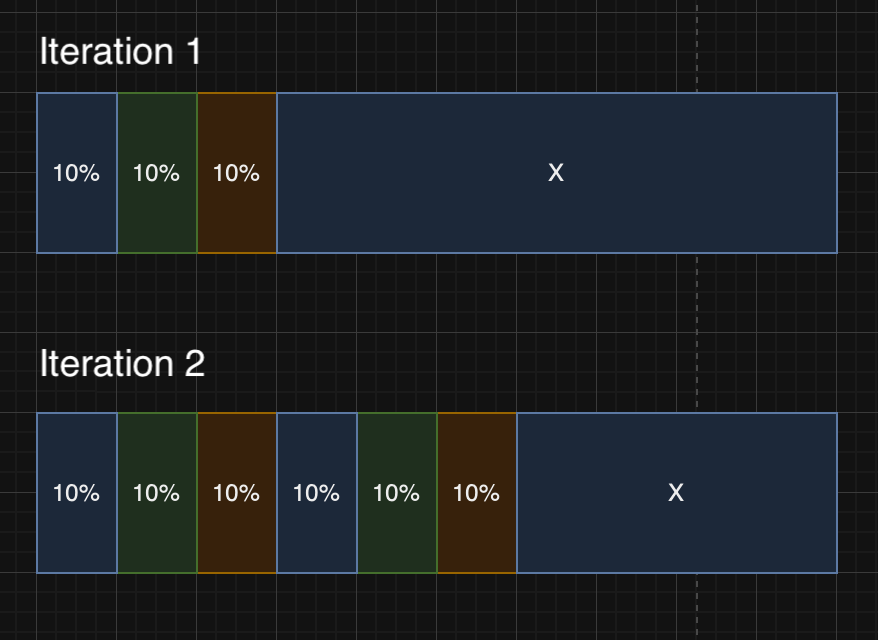
You add an experiment to a flag with three variations of Blue, Green, and Orange. You include 30% of total contexts in the experiment, with approximately 10% of traffic assigned to each variation.
The remaining 70% of traffic receives the control variation of Blue. The control traffic is not part of the experiment nor its analysis.
Next, you increase your experiment traffic from 30% to 60%. This creates a new iteration of the experiment. In the new iteration, the 30% that were already receiving variations Blue, Green, and Orange continue to receive those variations, but are no longer included in the experiment nor its analysis. New traffic is used for the additional 30% allocated to the experiment.
Here is a visualization of the traffic allocation in the first and second iterations: