

How regression detection works
Guarded rollouts compare the performance of the new variation to the original variation throughout the rollout. LaunchDarkly evaluates metric results on a regular schedule and identifies a regression when the result is statistically significant and indicates worse performance based on the metric’s success criteria. LaunchDarkly detects regressions using the following process:- Measure the difference: LaunchDarkly calculates the absolute difference between the new variation and the original variation. This difference is expressed using the metric’s unit, such as percentage points for binary metrics. In this context, “absolute difference” means the new variation estimate minus the original variation estimate. It does not mean the absolute value of the difference.
- Estimate uncertainty: LaunchDarkly calculates a confidence interval for the difference. The confidence interval shows the range of potential differences between the new variation estimate and the original variation estimate.
- Apply metric success criteria: Each metric defines whether higher or lower values are better. This determines what counts as worse performance. For lower-is-better metrics, LaunchDarkly calls a regression when the new variation’s value is statistically likely to be larger than the original variation’s value. For higher-is-better metrics, LaunchDarkly calls a regression when the new variation’s value is statistically likely to be smaller than the original variation’s value.
-
Wait for sufficient data: A guarded rollout must reach the minimum sample size before LaunchDarkly can make regression decisions. LaunchDarkly requires at least 10 contexts for each variation. You cannot change this value in the LaunchDarkly UI or in a release policy. To request a different value for your account, start a Support ticket.
How LaunchDarkly counts the sample depends on the metric type and configuration:
- Conversion metrics: Counts unique contexts exposed to each variation.
- Numeric metrics that use average analysis, include units with no events: Counts all unique contexts exposed to the variation.
- Numeric metrics that use average analysis, exclude units with no events: Counts only unique contexts that created a metric event.
- Evaluate results during each check: During a guarded rollout, LaunchDarkly checks for regressions on a regular schedule. These checks occur approximately every 10 seconds. At each check, LaunchDarkly processes recent metric events, recalculates the absolute difference between the new and original variations, and evaluates whether the result is statistically significant using sequential testing.
- Detect regressions: LaunchDarkly identifies a regression when the observed absolute difference is statistically significant and indicates a negative impact on a monitored metric. This occurs when the absolute difference confidence interval falls entirely on the side of worse performance based on the metric’s success criteria.
How to interpret metric results
Each metric in a guarded rollout includes a difference chart. Use the difference chart to see how the new variation is performing compared to the original variation. The chart includes two visual elements:- The line shows the observed difference between the new and original variations.
- The shaded area shows the confidence interval for the absolute difference.
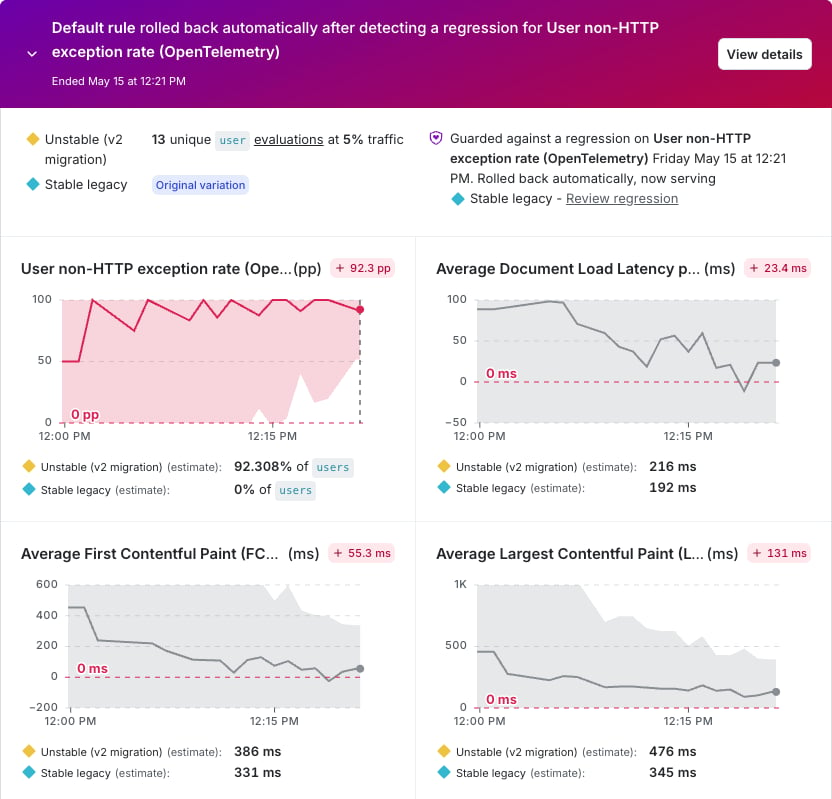
An active guarded rollout with a detected regression.
- Lower-is-better metrics: LaunchDarkly identifies a regression when the confidence interval falls entirely above zero, indicating the new variation’s value is statistically likely to be larger than the original variation’s value. If the confidence interval includes zero or falls entirely below zero, LaunchDarkly has not detected a regression.
- Higher-is-better metrics: LaunchDarkly identifies a regression when the confidence interval falls entirely below zero, indicating the new variation’s value is statistically likely to be smaller than the original variation’s value. If the confidence interval includes zero or falls entirely above zero, LaunchDarkly has not detected a regression.
- Traffic volume and rollout percentage: Low traffic or small rollout percentages may take longer to collect enough data to measure a stage meaningfully.
- Minimum sample size: LaunchDarkly cannot make regression decisions until the rollout reaches the minimum sample size. If the rollout does not reach it, LaunchDarkly may extend the rollout before making a final decision.
- Metric type: Metrics that use extreme percentiles, such as P1 or P99, may require more samples than mean metrics to provide reliable results.
What happens when a regression is detected
When LaunchDarkly detects a regression, it alerts you to the affected metric so you can review the issue and decide how to proceed. Depending on your rollout configuration, LaunchDarkly pauses or rolls back the rollout to limit the impact of the regression. Depending on your rollout configuration, the following actions can occur:- The affected metric tile highlights the regression.
- The rollout may pause.
- LaunchDarkly can alert the flag maintainer.
- If automatic rollback is enabled, LaunchDarkly rolls back the change.