For AI agents: a documentation index is available at the root level at /llms.txt and /llms-full.txt. Append /llms.txt to any URL for a page-level index, or .md for the markdown version of any page.
Sign inTry it free
DocsGuidesSDKsIntegrationsAPI docsTutorialsFlagship blog
  • Get started
    • Overview
    • Onboarding
    • Get started
    • Launch Insights
    • LaunchDarkly architecture
    • LaunchDarkly vocabulary
  • AgentControl
    • AgentControl
    • Manage AgentControl
  • Feature flags
    • Create flags
    • Target with flags
    • Flag templates
    • Manage flags
    • Code references
      • Bitbucket code references
      • CircleCI code references
      • Custom configuration with ld-find-code-refs
      • GitHub code references
      • GitLab code references
    • Contexts
    • Segments
  • Releases
    • Releasing features with LaunchDarkly
    • Release policies
    • Percentage rollouts
    • Progressive rollouts
    • Guarded rollouts
    • Feature monitoring
    • Release pipelines
    • Engineering insights
    • Release management tools
    • Applications and app versions
    • Change history
    • Restoring previous flag versions
  • Observability
    • Observability
    • Session replay
    • Error monitoring
    • Logs
    • Traces
    • Observability metrics
    • Product analytics events
    • LLM observability
    • Alerts
    • Dashboards
    • Service map
    • Vega for auto-remediation
    • Observability MCP server
    • Search specification
    • Observability settings
    • Observability integrations
  • Experimentation
    • Experimentation
    • Experiment metric types
    • Experiment configuration
    • Managing experiments
    • Analyzing experiments
    • Multi-armed bandits
    • Holdouts
  • Metrics and events
    • Metrics in LaunchDarkly
    • Creating metrics
    • Metric groups
    • Events
    • Autogenerated metrics
  • Warehouse native
    • Warehouse native metrics
    • Setting up external warehouses
    • Creating experiments using warehouse native metrics
  • Infrastructure
    • Connect apps and services to LaunchDarkly
    • LaunchDarkly in China and Pakistan
    • LaunchDarkly in the European Union (EU)
    • LaunchDarkly in federal environments
    • Public IP list
  • Your account
    • Projects
    • Views
    • Environments
    • Tags
    • Teams
    • Members
    • Roles
    • Account security
    • Feature previews
    • Billing and usage
    • Changelog
Sign inTry it free
LogoLogo
On this page
  • Overview
  • Prerequisites
  • Set up GitLab code references
  • How the script works
  • Additional configuration options
Feature flagsCode references

GitLab code references

Was this page helpful?
Previous

Contexts

Next
Built with
Code references are available to customers on select plans

Code references are only available to customers on select plans. To learn more, read about our pricing. To upgrade your plan, contact Sales.

Overview

This topic explains how to set up and configure the GitLab code references to use with LaunchDarkly.

You can use the ld-find-code-refs utility with GitLab CI to automatically populate code references in LaunchDarkly.

Follow the procedure below to create a GitLab code references configuration using LaunchDarkly’s code references executable.

Prerequisites

To complete this procedure, you must have the following prerequisites:

  • An API access token with write permissions for the code-reference-repository resource, either through a base role, a LaunchDarkly-provided project role, or another role that you have created. To learn more, read API access tokens and Code reference actions.

Set up GitLab code references

Here’s how to set up the GitLab code references:

  1. Navigate to your GitLab project’s CI / CD settings by clicking through Your project, then Settings, then CI/CD.
  2. Expand Variables.
  3. Create a variable called LD_ACCESS_TOKEN. Use the same value as your LaunchDarkly access token. Click the toggle to set the variable to Masked.
  4. Create a variable called LD_PROJECT_KEY. Use your LaunchDarkly project’s key as the value. To learn how to find your project key, read Project keys. To learn more about setting variables, read GitLab’s documentation.
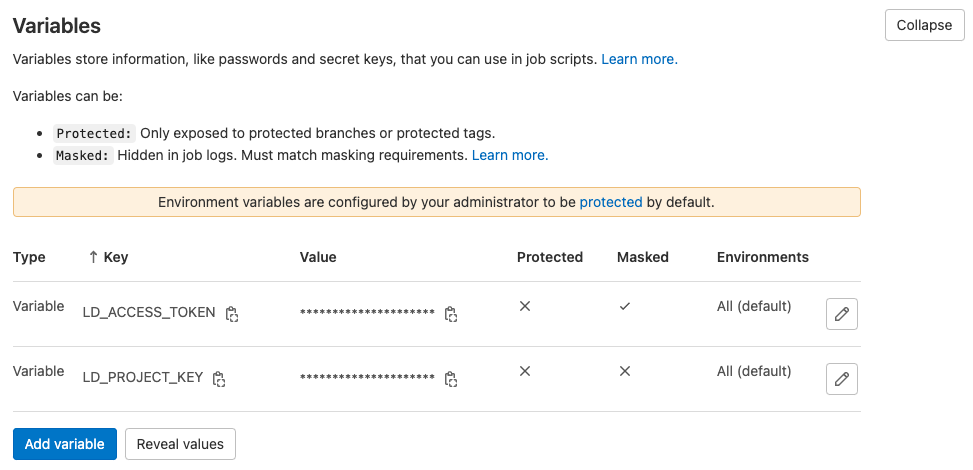
The GitLab Variables dialog with masked "LD_ACCESS_TOKEN" and "LD_PROJECT_KEY" created.

The GitLab Variables dialog with masked "LD_ACCESS_TOKEN" and "LD_PROJECT_KEY" created.
  1. Open your .gitlab-ci.yml file. This file defines your project’s CI/CD pipeline. To learn more about getting started with GitLab code references, read GitLab’s documentation.
  2. Copy and paste the following into .gitlab-ci.yml. No changes to the script are needed if your pipeline runs on Alpine Linux. If apk is unavailable in your environment then you’ll need to modify the first three steps to use a different package manager:
YAML
1find-launchdarkly-code-refs:
2 stage: deploy
3 image:
4 name: launchdarkly/ld-find-code-refs:latest
5 entrypoint: [""]
6 script:
7 - ld-find-code-refs
8 --accessToken $LD_ACCESS_TOKEN
9 --projKey $LD_PROJECT_KEY
10 --dir $CI_PROJECT_DIR
11 --repoName $CI_PROJECT_NAME
12 --repoUrl $CI_PROJECT_URL
13 --repoType gitlab
14 --branch $CI_COMMIT_REF_NAME
15 --updateSequenceId $CI_PIPELINE_IID
16 --userAgent gitlab-pipeline

How the script works

When executed, this script downloads and runs the ld-find-code-refs docker image.

This script runs the docker image with previously-set variables, as well as GitLab-specific configurations.

The find-launchdarkly-code-refs script runs in GitLab’s deploy phase. As written, find-launchdarkly-code-refs runs concurrent to other scripts in the deploy stage. We positioned the script this way so problems running ld-find-code-refs won’t block the deployment pipeline.

In the example .gitlab-ci.yml below, the find-launchdarkly-code-refs script runs as a part of a project’s pipeline:

YAML
1image: alpine:latest
2
3build1:
4 stage: build
5 script:
6 - echo "Build something"
7
8test1:
9 stage: test
10 script:
11 - echo "Test something"
12
13deploy1:
14 stage: deploy
15 script:
16 - echo "Deploy something"
17
18find-launchdarkly-code-refs:
19 stage: deploy
20 image:
21 name: launchdarkly/ld-find-code-refs:latest
22 entrypoint: [""]
23 script:
24 - ld-find-code-refs
25 --accessToken $LD_ACCESS_TOKEN
26 --projKey $LD_PROJECT_KEY
27 --dir $CI_PROJECT_DIR
28 --repoName $CI_PROJECT_NAME
29 --repoUrl $CI_PROJECT_URL
30 --repoType gitlab
31 --branch $CI_COMMIT_REF_NAME
32 --updateSequenceId $CI_PIPELINE_IID
33 --userAgent gitlab-pipeline

When the jobs run in the pipeline, they display like this:
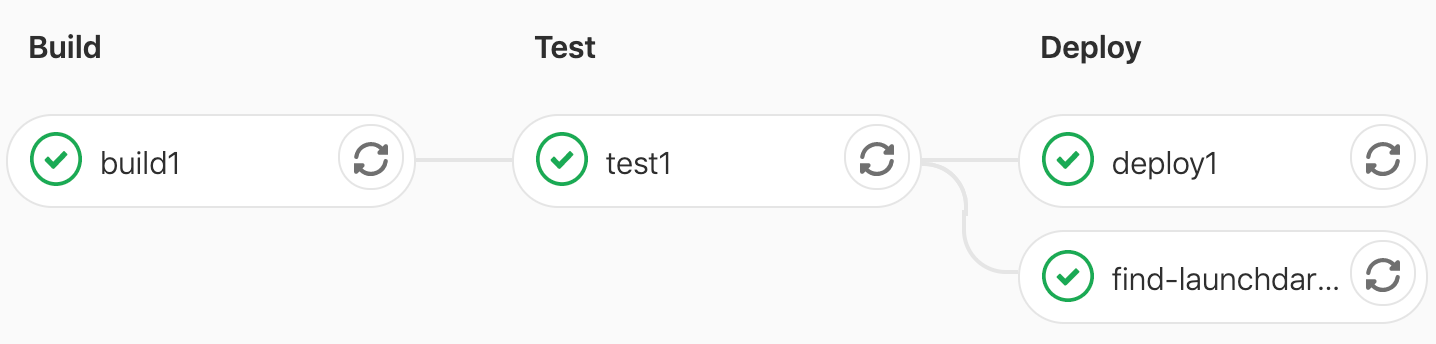
A screenshot of the jobs running.

A screenshot of the jobs running.

Additional configuration options

There are more configuration options for ld-find-code-refs.

You can exclude files and directories from searches with an .ldignore file.

You can use the .launchdarkly/coderefs.yaml file for advanced configuration, such as configuring custom delimiters and aliases for your flag keys.

To learn more, read the configuration documentation.