For AI agents: a documentation index is available at the root level at /llms.txt and /llms-full.txt. Append /llms.txt to any URL for a page-level index, or .md for the markdown version of any page.
Sign inTry it free
DocsGuidesSDKsIntegrationsAPI docsTutorialsFlagship blog
  • Get started
    • Overview
    • Onboarding
    • Get started
    • Launch Insights
    • LaunchDarkly architecture
    • LaunchDarkly vocabulary
  • AgentControl
    • AgentControl
    • Manage AgentControl
  • Feature flags
    • Create flags
    • Target with flags
    • Flag templates
    • Manage flags
      • The Flags list
      • Comparing and copying flag settings
      • Viewing flags across environments
      • Deprecating flags
      • Archiving flags
      • Deleting flags
      • Flag prerequisites
      • The off variation
      • The default rule
      • Flag statuses and lifecycle stages
      • Flag lifecycle settings
      • Project-level flag settings
      • Vega for flag cleanup
    • Code references
    • Contexts
    • Segments
  • Releases
    • Releasing features with LaunchDarkly
    • Release policies
    • Percentage rollouts
    • Progressive rollouts
    • Guarded rollouts
    • Feature monitoring
    • Release pipelines
    • Engineering insights
    • Release management tools
    • Applications and app versions
    • Change history
    • Restoring previous flag versions
  • Observability
    • Observability
    • Session replay
    • Error monitoring
    • Logs
    • Traces
    • Observability metrics
    • Product analytics events
    • LLM observability
    • Alerts
    • Dashboards
    • Service map
    • Vega for auto-remediation
    • Observability MCP server
    • Search specification
    • Observability settings
    • Observability integrations
  • Experimentation
    • Experimentation
    • Experiment metric types
    • Experiment configuration
    • Managing experiments
    • Analyzing experiments
    • Multi-armed bandits
    • Holdouts
  • Metrics and events
    • Metrics in LaunchDarkly
    • Creating metrics
    • Metric groups
    • Events
    • Autogenerated metrics
  • Warehouse native
    • Warehouse native metrics
    • Setting up external warehouses
    • Creating experiments using warehouse native metrics
  • Infrastructure
    • Connect apps and services to LaunchDarkly
    • LaunchDarkly in China and Pakistan
    • LaunchDarkly in the European Union (EU)
    • LaunchDarkly in federal environments
    • Public IP list
  • Your account
    • Projects
    • Views
    • Environments
    • Tags
    • Teams
    • Members
    • Roles
    • Account security
    • Feature previews
    • Billing and usage
    • Changelog
Sign inTry it free
LogoLogo
On this page
  • Overview
  • Compare and copy flag settings between two environments
Feature flagsManage flags

Comparing and copying flag settings

Was this page helpful?
Previous

Viewing flags across environments

Next
Built with
Copying flag settings is available to customers on select plans

Copying flag settings is only available to customers on select plans. To learn more, read about our pricing. To upgrade your plan, contact Sales.

Overview

This topic explains how to compare and copy flag settings between two environments.

To learn how to clone a flag, rather than just copy its settings, read Cloning existing flags.

Compare and copy flag settings between two environments

To compare and copy a flag’s settings:

  1. In the left navigation, click Code. The CodeControl menu appears.
  2. Click Flags.
  3. Click the three-dot overflow menu for one of the environments you want to compare.
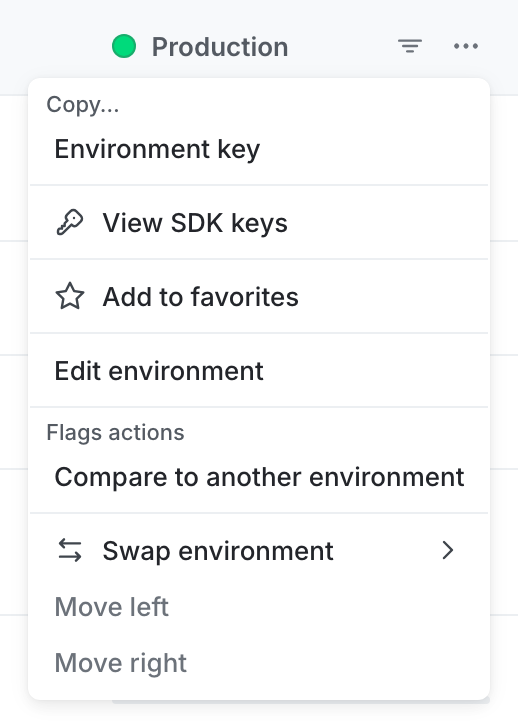
The environment overflow menu.

The environment overflow menu.
  1. Choose Compare to another environment. The “Flag comparison” screen appears.
  2. Choose a Source environment from the menu. This is the environment you will be copying flag settings from.
  3. Choose a Target environment. This is the environment you will be copying flag settings into. A list of flags appears indicating the differences between the two environments:
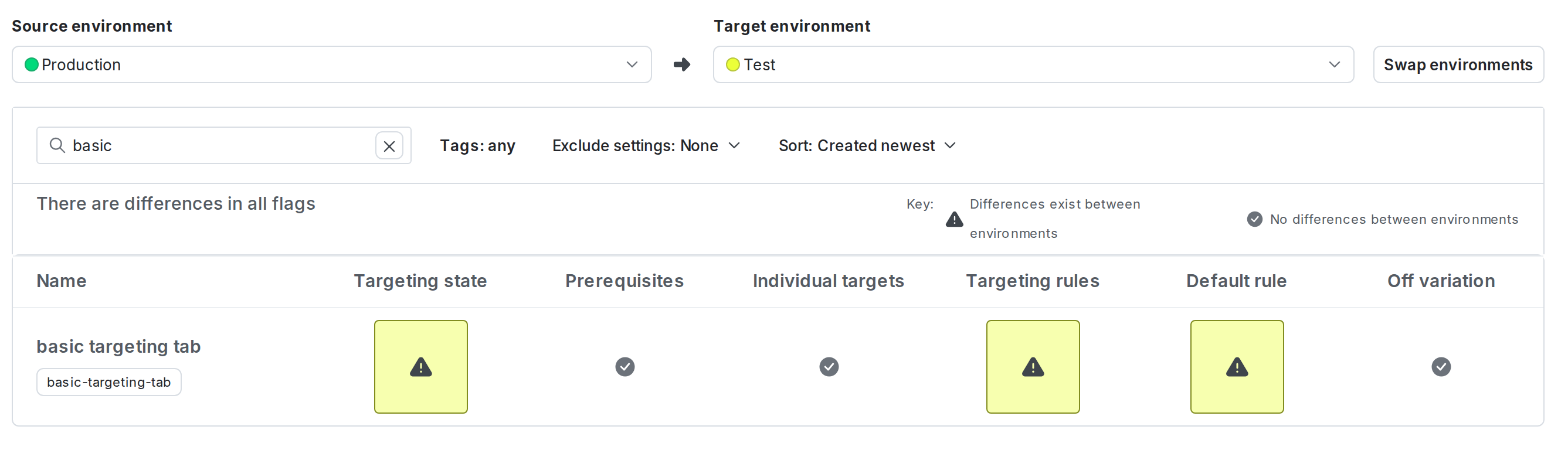
The "Compare flags" screen with two environments selected.

The "Compare flags" screen with two environments selected.
Contexts and segments are environment-specific

Individual targeting and segment targeting are specific to an environment. Even if two different environments have a context or segment with the same name in each environment, LaunchDarkly treats them as distinct. For example, if a flag targets two segments both named “Beta users” in two different environments, LaunchDarkly displays an exclamation point icon indicating a difference in targeting rules between the two environments.

  1. Click a flag’s row to view how the flag’s settings differ between the two environments. The current flag settings for the target environment appear in the first column, and the proposed flag settings for the target environment appear in the second column.
  2. Select checkboxes to choose which settings you would like to copy from the source environment:
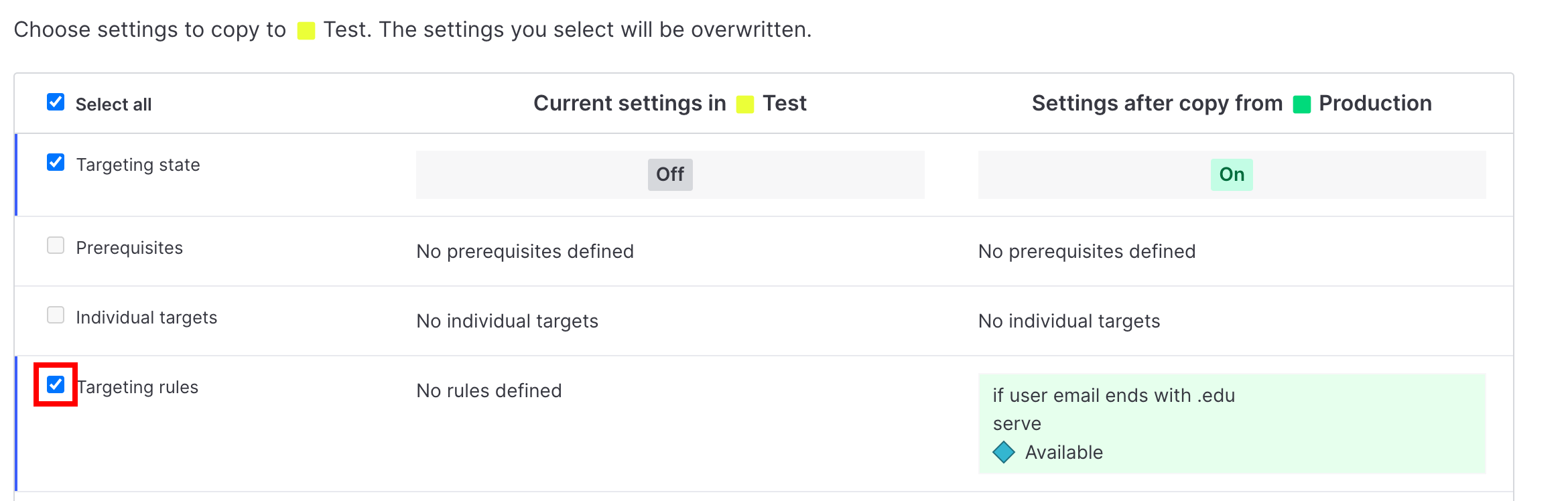
The comparison screen with a checkbox called out.

The comparison screen with a checkbox called out.
  1. Click Copy settings. Or, optionally click the more options menu and select “Request approval” to send an approval request for your changes.

Your settings are now copied into the target environment.

If the environment you’re copying changes to requires approval, you will be prompted to request approval from another member. To learn more, read Approvals.

Restrictions on custom targeting rules

You can copy all custom targeting rules simultaneously with the Select all checkbox. However, if one of your rules references a segment that does not exist in the target environment, you cannot copy any targeting rules. You will still be able to copy Targeting state, Prerequisites, Individual context targets, the Default rule when on, and the default off variation (“If targeting is off, serve”).

Restrictions on rollouts

If one of the flag targeting rules in your source environment has an active guarded rollout or progressive rollout, then in the target environment that rule is created as a percentage rollout with allocations that match the current guarded or progressive rollout in the source environment.