
Custom conversion binary metrics
This topic explains how to create a custom conversion binary metric in LaunchDarkly.
About custom conversion binary metrics
Custom conversion binary metrics track how many contexts trigger an event. You can use this metric with any event you set up in your codebase.
For example, you can use custom conversion binary metrics to track:
- How many customers submitted a form
- How many customers made a successful payment
- How many customers encountered an error
SDKs send events at regular intervals, such as every five seconds. If a browser redirects an end user to another page, any events that occurred between when the SDK last sent events and when the browser redirected are lost. To avoid this, call track and then flush when you know the browser redirects an end user to another page, such as on click. To learn more, read Tracking custom events and Flushing events.
Example metric in SQL
Some customers find it helpful to think about LaunchDarkly metric calculations in terms of SQL statements. The following example shows how a custom conversion binary metric could be represented as a SQL expression, using example table and column names to represent metric components:
In this example:
eventsis a table that stores all of the metric events on which the metric is defined.exposuresis a table that contains flag evaluation data collected during an experiment or guarded rollout that uses the metric.user_idis a table column that represents the context both for the metric analysis unit and for the randomization unit used in the experiment or guarded rollout. This example uses the “user” context kind, but a metric can use other context kinds, such as “account,” “session,” or “device.”
Metric definition
When you configure the metric definition for a custom conversion binary metric, you first select Occurrence (Percent) to define both the aggregation method and analysis method for the metric. You then select one or more context kinds for which you will count events.
Then, custom conversion binary metric definition options include:
- The analysis units to use for measuring the event. This can be one or more context kinds, such as “user,” “device,” or “request,” that the metric can measure events from.
- Success criteria:
- higher is better: choose this option for metrics measuring positive things like cart checkouts or sign-ups.
- lower is better: choose this option for metrics measuring negative things like errors.
To learn more about the metric definition options, read Metric components.
Create custom conversion binary metrics
Custom conversion binary metrics require an event key from your application’s code to track conversions for any event in your code. To add a custom conversion binary metric in LaunchDarkly, you must identify it with a code snippet embedded in your app.
This is an example of sending a custom event:
The area of your code you should put custom conversion binary metric information into, and the type of information you should include, varies based on which SDKs you use. Often, the information you should put in your code includes the event key, context object, data field, or numeric value fields.
Sending custom events to LaunchDarkly requires a unique event key. Set the event key to anything you want. Adding this event key to your codebase lets your SDK track actions customers take in your app as events. To learn more, read Tracking custom events.
LaunchDarkly also automatically generates a metric key when you create a metric. You only use the metric key to identify the metric in API calls. To learn more, read Creating and managing metrics.

Try it in your SDK: Tracking custom events
To create a custom conversion binary metric:
- Open the Data section and navigate to the Metrics list.
- Click Create metric. The “Create metric” dialog appears.
- If you use warehouse native metrics, you can select either LaunchDarkly hosted or Warehouse native.
- Select LaunchDarkly hosted to measure events from LaunchDarkly SDKs.
- Select Warehouse native to measure events from an external warehouse, such as Snowflake.
- Select an existing Metric data source or click + Create to create a new data source. To learn more, read Metric data sources.
- Select an event kind of Custom if you chose the LaunchDarkly hosted event source.
- Search for or enter an Event key.
- A list of events your environment has recently received appears when you click into the Event key field. Begin typing an event key to view a list of events that match your search. Hover over an event from the list to view which environments the event appears in, which context kinds sent the latest event, and which SDKs the event is coming from.
- Choose Occurrence (Percent) from the menu in the Metric definition section. The window populates a full metric definition using default values.
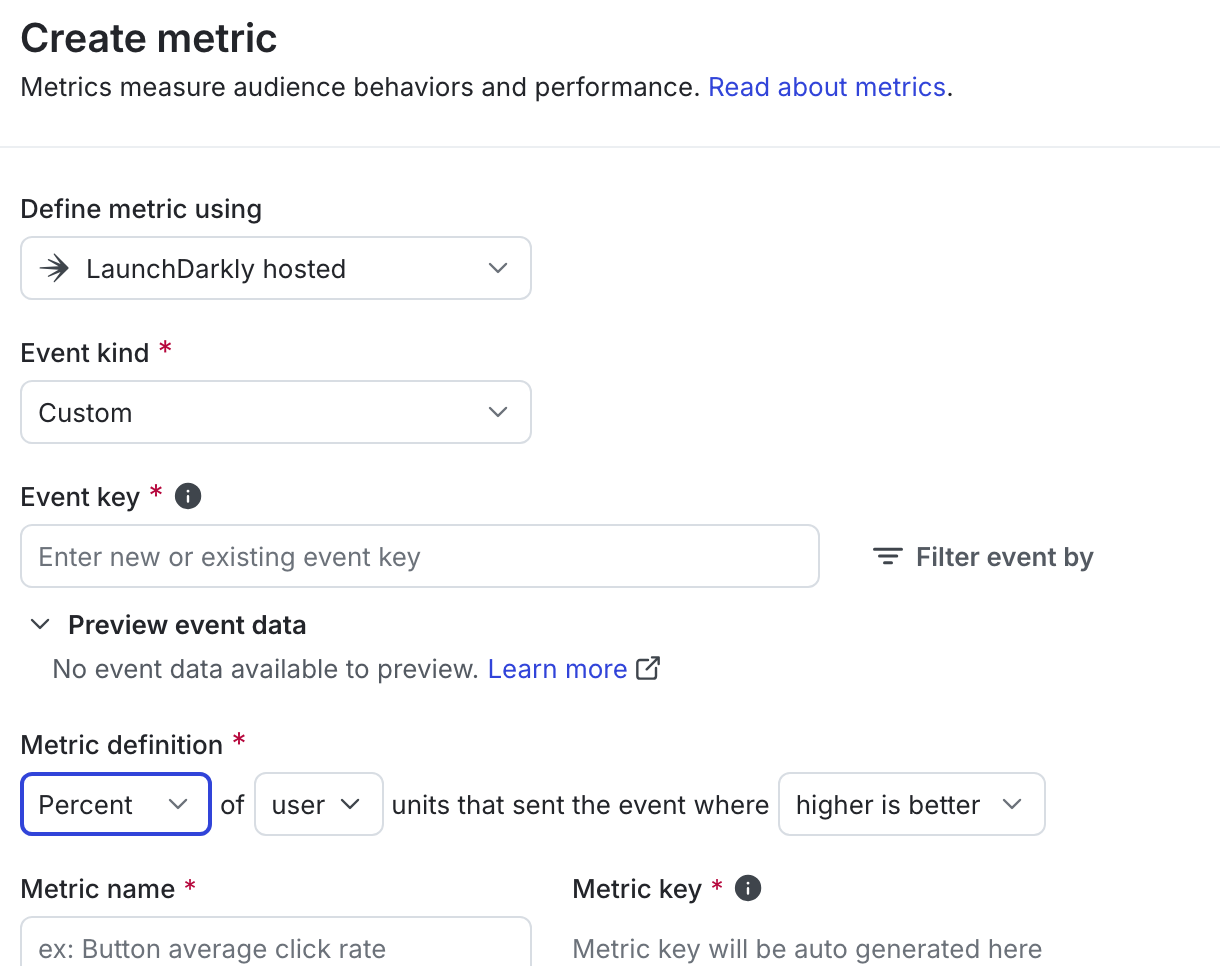
- Change options in the “Metric definition” drop-down menus as needed:
- Change or select additional context kinds to use as the analysis units for the metric. Only context kinds marked as available for experiments and guarded rollouts appear as options. To learn more, read Mark context kinds available for experiments.
- Choose higher is better or lower is better to define success criteria for attached experiments or guarded rollouts.
- Enter a metric Name.
- (Optional) Add a Description.
- (Optional) Add any Tags.
- (Optional) Update the Maintainer.
- Click Create.
You can connect the metric to an experiment or guarded rollout to monitor the impact of a flag change.

You can also use the REST API: Create metric