
Deprecating flags
This topic explains how to deprecate flags you no longer need.
About deprecating flags
When a flag is still being served to customers, but it is only being served in older or deprecated versions of your application, it may be time to deprecate it. Deprecating a flag hides it from the live Flags list without archiving or deleting it. You can restore a deprecated flag if you need it, or find it to reference or update its configuration later.
Deprecating flags can simplify your Flags list, especially in situations where you have a long tail of customers using older versions of your applications.
You can only deprecate flags that you use with client-side SDKs.
Deprecated flags are still evaluated, just like live flags. If you are completely done with a flag, you should archive it instead. To learn more, read Archiving flags.
Deprecate flags
To deprecate a flag:
- In the left sidebar, click Code. The CodeControl menu appears.
- Click Flags.
- Open the flag you wish to deprecate.
- Click the three-dot overflow menu in the right sidebar.
- Select Deprecate. The “Deprecate flag” dialog appears.
- The dialog shows you how the flag has been evaluated recently.
All flags exist in every environment for a project, but often only a few environments matter for your organization’s production processes. Deprecating a flag will remove it from the live Flags list for every environment in the project.
- Click Deprecate.
The flag is deprecated and removed from the live Flags list. You can find it in the deprecated Flags list. To learn more, read View and restore flags.
View and restore flags
By default, the Flags list shows live flags only.
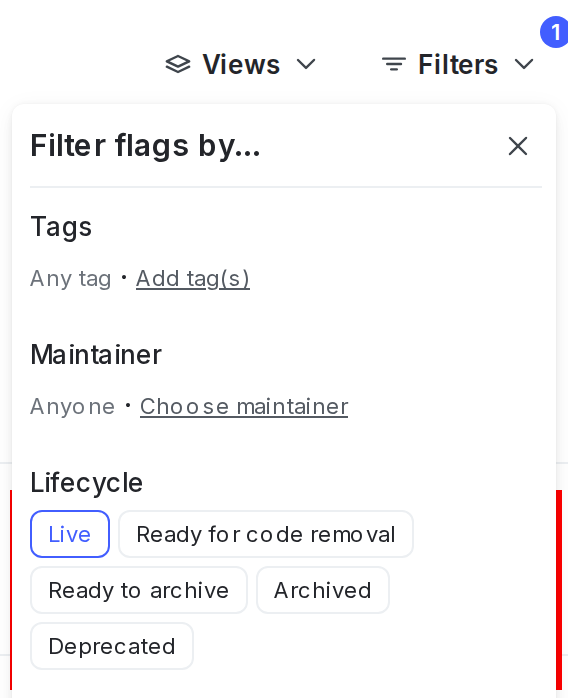
To view deprecated flags, click Filters from the Flags list and select “Deprecated” under “Lifecycle”:
To restore a deprecated flag:
- In the left sidebar, click Code. The CodeControl menu appears.
- Click Flags.
- Click Filters. In the “Lifecycle” section, click “Deprecated.” The deprecated flag list appears.
- Click a flag name to open the flag you wish to restore.
- Click the three-dot overflow menu in the right sidebar.
- Select Restore. The “Restore flag” dialog appears.
- The dialog shows you how the flag has been evaluated recently.
- Click Restore. The flag appears in the live Flags list.