
Flag prerequisites
Flag prerequisites are only available to customers on select plans. To learn more, read about our pricing. To upgrade your plan, contact Sales.
This topic explains how to use feature flag prerequisites to enable or disable features based on different states.
Prerequisites allow you to control feature dependencies in LaunchDarkly. You can make flags depend on other flags being enabled to take effect.
About prerequisite and dependent flags
To meet a prerequisite, the prerequisite flag must be On, and the context must be receiving the variation of the prerequisite flag that you specify. If the prerequisite is met, the dependent flag’s targeting rules are evaluated. If the prerequisite is not met, the dependent flag serves the “If targeting is off, serve” variation.
In the following example, the prerequisite is met when the prerequisite flag is On and the target is receiving the “Enabled” variation of the prerequisite flag:
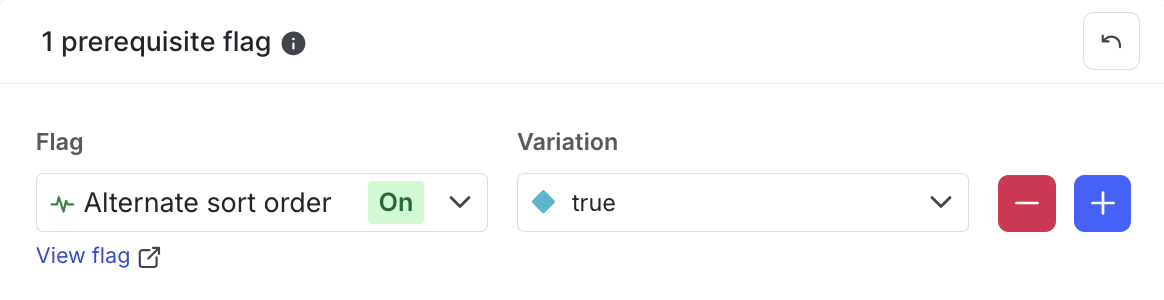
To meet a prerequisite, the prerequisite flag must be On. LaunchDarkly considers the prerequisite unmet if the prerequisite flag is Off, no matter what variation of the prerequisite flag the target is receiving.
For example, if a prerequisite flag serves “false” when targeting is Off, even if the variation specified in the prerequisite section is “false,” LaunchDarkly still considers the prerequisite unmet when the flag is Off.
Behavior when prerequisites are unmet
If the prerequisite flag is Off, or if the context isn’t receiving the specified variation of the prerequisite flag, the context will receive the “If targeting is off, serve” variation of the dependent flag.
Add or update a prerequisite for a flag
You can add a prerequisite after you create the dependent flag, or later when you add or update targeting rules for the dependent flag.
If you’re using client-side or mobile SDKs, then both the dependent and prerequisite flags must be available to client-side or mobile SDKs.
Add prerequisites to a new flag
To add a prerequisite when you create the dependent flag:
- Follow the instructions for creating a new flag.
- In the “Additional configurations” section, under “Prerequisite flags,” click + to add a prerequisite flag.
- In the Flag field, find and select the prerequisite flag.
- In the Variation field, select the variation of the prerequisite flag.
- Click Create flag.
If you add a prerequisite during flag creation, the prerequisite applies for all environments.
Add prerequisites to an existing flag
To add a prerequisite flag to an existing flag, in a particular environment:
- Navigate to the dependent flag’s Targeting tab.
- If the flag is off and the rules are hidden, click View targeting rules.
- Click the + button between existing rules, and select Set prerequisites.
- If there are existing prerequisites, find the prerequisite rules and select Edit. Then click + to add an additional prerequisite.
- In the Flag field, find and select the prerequisite flag.
- In the Variation field, select the variation of the prerequisite flag.
- Click Review and save.
To learn how to add prerequisite flags using JSON, read Prerequisites.
Update or remove prerequisites
To update or remove a prerequisite flag in a particular environment:
- Navigate to the dependent flag’s Targeting tab.
- Find the “N prerequisite flags” section. “N” represents the number of prerequisite flags specified for this dependent flag in this environment.
- Click Edit:
- To update an existing prerequisite, update the Flag or Variation fields.
- To add a new prerequisite, click +. Then update the Flag or Variation fields for the new prerequisite.
- To remove a prerequisite, click -.
- Click Review and save.
Repeat this procedure as necessary for other environments. When you update or remove a prerequisite flag from the dependent flag’s Targeting tab, the change only applies to the current environment.
Multiple prerequisite flags
Flags can be dependent on multiple prerequisite flags. If a dependent flag has multiple prerequisite flags, then all of the prerequisite flag requirements must be met for LaunchDarkly to evaluate the dependent flag for a context.
A prerequisite flag displays any dependent flags on its Targeting tab:


You can also use the REST API: List dependent feature flags, List dependent feature flags by environment
LaunchDarkly automatically prevents you from saving changes that would introduce circular dependencies between prerequisites. For example, you cannot make Flag A a prerequisite of Flag B and also make Flag B a prerequisite of Flag A.
You cannot delete a flag that is a prerequisite for other flags. You must remove the dependency before you can delete the prerequisite flag.