For AI agents: a documentation index is available at the root level at /llms.txt and /llms-full.txt. Append /llms.txt to any URL for a page-level index, or .md for the markdown version of any page.
Sign inTry it free
DocsGuidesSDKsIntegrationsAPI docsTutorialsFlagship blog
  • Get started
    • Overview
    • Onboarding
    • Get started
    • Launch Insights
    • LaunchDarkly architecture
    • LaunchDarkly vocabulary
  • AgentControl
    • AgentControl
    • Manage AgentControl
  • Feature flags
    • Create flags
    • Target with flags
    • Flag templates
    • Manage flags
    • Code references
    • Contexts
    • Segments
  • Releases
    • Releasing features with LaunchDarkly
    • Release policies
    • Percentage rollouts
    • Progressive rollouts
    • Guarded rollouts
    • Feature monitoring
    • Release pipelines
    • Engineering insights
    • Release management tools
    • Applications and app versions
    • Change history
    • Restoring previous flag versions
  • Observability
    • Observability
    • Session replay
    • Error monitoring
    • Logs
    • Traces
    • Observability metrics
    • Product analytics events
    • LLM observability
    • Alerts
    • Dashboards
    • Service map
    • Vega for auto-remediation
    • Observability MCP server
    • Search specification
    • Observability settings
    • Observability integrations
  • Experimentation
    • Experimentation
    • Experiment metric types
    • Experiment configuration
    • Managing experiments
    • Analyzing experiments
    • Multi-armed bandits
    • Holdouts
  • Metrics and events
    • Metrics in LaunchDarkly
    • Creating metrics
    • Metric groups
    • Events
    • Autogenerated metrics
  • Warehouse native
    • Warehouse native metrics
    • Setting up external warehouses
      • BigQuery native Experimentation
      • Databricks native Experimentation
      • Redshift native Experimentation
      • Snowflake native Experimentation
        • Data requirements
        • Setting up the Snowflake integration
        • Snowflake common questions
      • Warehouse health checks
    • Creating experiments using warehouse native metrics
  • Infrastructure
    • Connect apps and services to LaunchDarkly
    • LaunchDarkly in China and Pakistan
    • LaunchDarkly in the European Union (EU)
    • LaunchDarkly in federal environments
    • Public IP list
  • Your account
    • Projects
    • Views
    • Environments
    • Tags
    • Teams
    • Members
    • Roles
    • Account security
    • Feature previews
    • Billing and usage
    • Changelog
Sign inTry it free
LogoLogo
On this page
  • Overview
  • Snowflake native Experimentation architecture
Warehouse nativeSetting up external warehouses

Snowflake native Experimentation

Was this page helpful?
Previous

Snowflake data requirements

Next
Built with
Contact us for help with configuring Snowflake native Experimentation

If you have both Data Export and Experimentation enabled for your LaunchDarkly account, you should have access to Snowflake native Experimentation. If you do not have access or need help getting started, contact your LaunchDarkly representative or start a Support ticket.

Overview

This category includes documentation about how to connect LaunchDarkly to Snowflake and run LaunchDarkly experiments using metric events from your Snowflake warehouse. You can then export experiment data into Snowflake where your data teams can conduct custom, advanced analysis in addition to the experiment analysis conducted by LaunchDarkly.

Before you can begin running Snowflake native experiments, you must configure the Snowflake Data Export integration in LaunchDarkly.

Read the following topics to understand how to configure the required integration, create a Snowflake native experiment, and analyze the experiment results:

  • Snowflake Data Export
  • Setting up the Snowflake integration
  • Creating experiments using warehouse native metrics
  • Analyzing experiments

Snowflake native Experimentation architecture

Configuring Snowflake Data Export and Snowflake native Experimentation sets up the following virtual warehouses in your Snowflake instance:

  • LD_EXPORT_WH
  • LD_SERVICE_WH

Using these warehouses for periodic operations helps reduce compute and gives you visibility into where you are using compute.

The basic data flow process for LaunchDarkly’s Snowflake native Experimentation is as follows:

  • End users encounter LaunchDarkly experiments and generate flag evaluations, called “assignment data” in Snowflake. LaunchDarkly SDKs send these events to LaunchDarkly.
  • Using LaunchDarkly’s Snowflake Data Export integration, the Snowflake LD_EXPORT_WH warehouse pulls flag evaluation and experiment metadata into your Snowflake instance.
  • LaunchDarkly uses the Snowflake LD_SERVICE_WH warehouse to periodically sync experiment results from Snowflake to LaunchDarkly. You can view the results in LaunchDarkly on the experiment’s Results tab.

Here is an illustration of the Snowflake native Experimentation architecture:
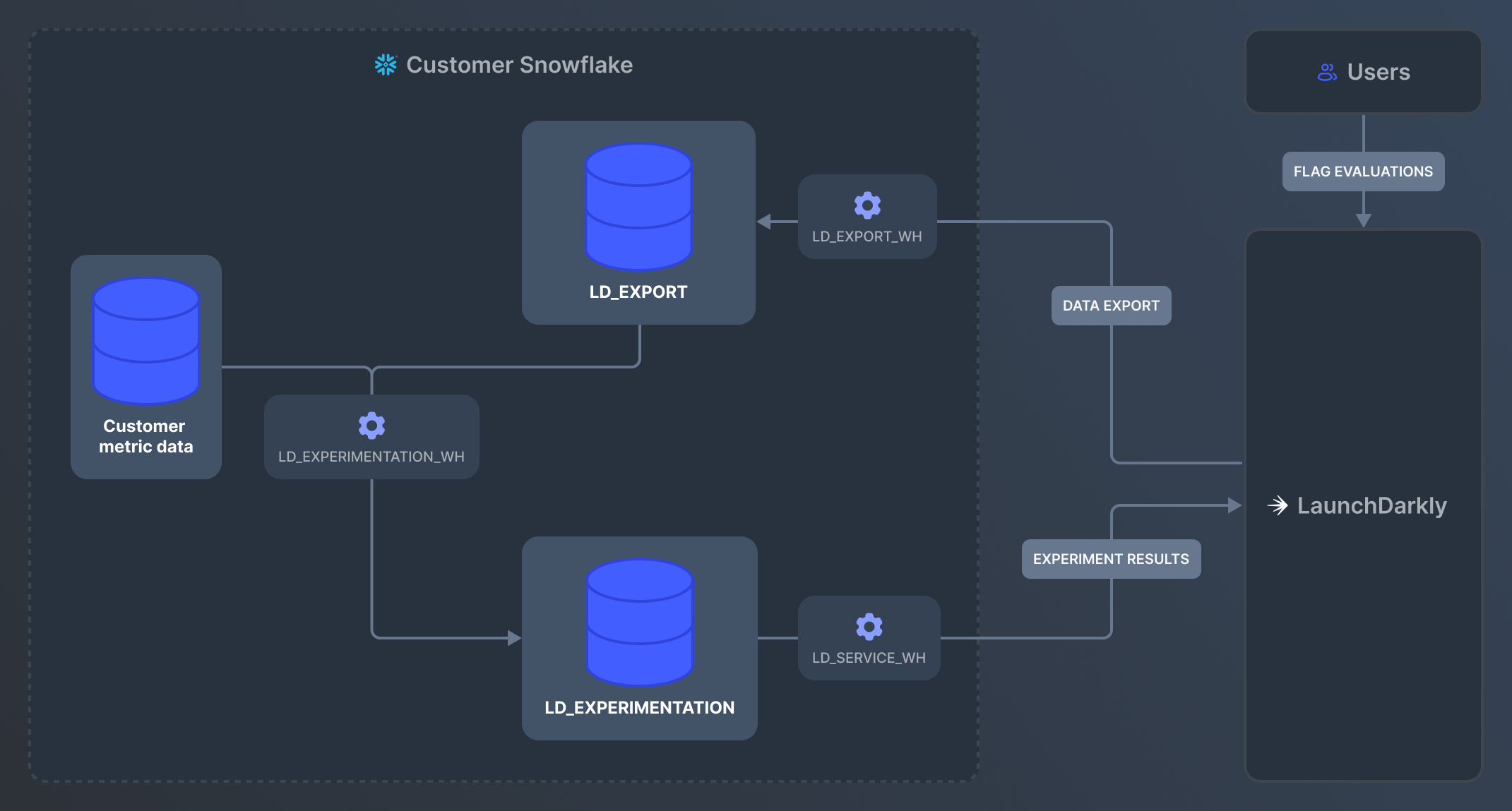
An illustration of Snowflake native Experimentation architecture.

An illustration of Snowflake native Experimentation architecture.