
Metric measurement window
This topic describes how to use metric measurement windows to prevent bias in warehouse native experiment results.
A metric measurement window defines a fixed, required period of time during which LaunchDarkly collects metrics for a context. A window begins after a context first receives a flag variation in an experiment, and ends after a configured duration.
Attached experiments only consider those metric events that occur within the configured measurement window, and the window must fully complete before the experiment includes any measurements for a context. When you stop an experiment, any metrics for contexts that have not reached the end of their measurement window do not contribute to experiment results.
You can only configure metric measurement windows with metrics created from Snowflake data sources, for use with warehouse native Experimentation. You cannot configure windows on metrics created from LaunchDarkly hosted events or other warehouse data sources. To learn more, read Metric event sources.
Avoiding measurement bias in experiments
Metric measurement windows ensure that all contexts included in an experiment have the same amount of time available to generate metric measurements. You define the period of time required to produce a conversion event or to produce the volume of metric values you want to measure. LaunchDarkly ensures that only measurements from completed windows are considered in experiment results. In this way, metric windows help you prevent late or incomplete user activities from biasing experiment results.
When no measurement window is configured (the default behavior), all contexts that participate in an experiment contribute equally to the experiment result. Contexts added near the end of the experiment have less time to generate metrics, so they can negatively impact the experiment results. For example, consider a conversion event that typically requires three days to complete. Most contexts that join the experiment in the last two days of the experiment will negatively impact the conversion metric, even if some of those contexts eventually generate a conversion. By configuring a metric window of three days, you ensure that the experiment only considers units that have the full three days in which to produce the conversion event.
Prerequisites and limitations
You can configure metric measurement windows for any warehouse native metric created from a Snowflake data source. You cannot configure windows on metrics created from LaunchDarkly hosted events or other warehouse data sources. To learn more, read Snowflake native Experimentation.
The data source you use for creating the metric must map the Timestamp value to a column that uses timestamp or datetime format and encodes timezone information. To learn more, read Metric data sources.
By default, new metrics do not include a metric measurement window. When no measurement window is configured, all metric measurements collected during an experiment contribute equally to the experiment result. This matches the LaunchDarkly experiment and guarded release behavior prior to the introduction of metric windows.
Configuring a metric window
When you choose the duration of a metric measurement window, keep in mind:
- The duration you choose should be long enough to capture all relevant measurements. LaunchDarkly stops measuring events for a context after the window completes.
- If your conversion events require a lengthy period of user activity to generate, ensure that experiments run long enough to capture the needed volume of completed metric windows.
- If you are measuring an activity that requires a lengthy setup process, you can optionally configure an offset value to delay measurements until some point after a context first receives a flag evaluation. Offset values enable you to exclude early metric events that might be considered as “noise” in the overall measurement. For example, if you want to measure input validation errors that occur when customers complete a purchase, you could use an offset value to exclude input validation errors that occur earlier in the purchase process.
You configure optional metric window properties after you specify the analysis method for a warehouse native metric.
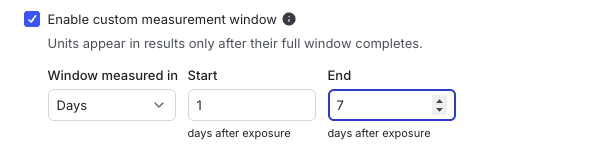
To configure a measurement window:
- Open the Data section and navigate to the Metrics list.
- Click Create metric. The “Create metric” dialog appears.
- Select Warehouse native from the “Event source” drop-down menu.
- Select an available Snowflake data source from the “Metric data source” drop-down menu. To learn more, read Metric data sources.
- Search for or enter an Event key to use for the metric.
- Choose options in the “Metric definition” section to configure the metric aggregation type and analysis method. To learn more, read Components of a metric.
- Select the Enable custom measurement window checkbox.
- Use the “Window measured in” menu to choose whether to define the window in days, hours, or minutes.
- (Optional) Change the value in the “Start” field to delay metric measurements for a period of time after a context receives a flag variation. A value of zero specifies no offset, meaning the measurement window begins immediately after a context joins the experiment.
- Enter a value in the “End” field to configure the length of the measurement window.
Both the “End” and “Start” values are calculated relative to when a context first receives a flag variation in an experiment. The “End” value must be greater than the “Start” value to configure a measurement window.
- Enter a Metric name and and optional Description.
- Click Create.
Interpreting metrics excluded from experiments
Metrics with measurement windows introduce additional conditions for excluding their measurements from experiment results. For any connected experiment, a context’s metric measurements are excluded if:
- Measurements occur outside of a configured metric window. Any metric events that occur before the window offset, and any events that occur after the window completes, are excluded from the experiment.
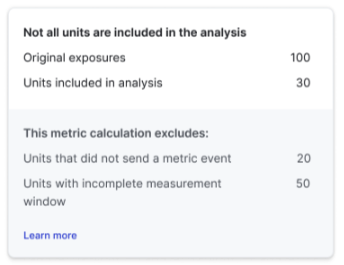
- A configured measurement window does not complete. If the experiment ends before a context’s measurement window completes, all measurements for that context are excluded.
- A configured measurement window completes, but the context generated no events. For numeric metrics, if you select the Exclude units that generate no events option, then contexts that complete their measurement window are excluded if they generate no event. To learn more, read Units without events.
LaunchDarkly experiments show the full accounting of units that are excluded from experiment results, both during the experiment and at experiment completion. To view a breakdown of why units are excluded from an experiment, click a value in the “Sample size” column of the experiment results.
To learn more, read Experiment results data.