For AI agents: a documentation index is available at the root level at /llms.txt and /llms-full.txt. Append /llms.txt to any URL for a page-level index, or .md for the markdown version of any page.
Sign inTry it free
DocsGuidesSDKsIntegrationsAPI docsTutorialsFlagship blog
  • Get started
    • Overview
    • Onboarding
    • Get started
    • Launch Insights
    • LaunchDarkly architecture
    • LaunchDarkly vocabulary
  • AgentControl
    • AgentControl
    • Manage AgentControl
  • Feature flags
    • Create flags
    • Target with flags
    • Flag templates
    • Manage flags
    • Code references
    • Contexts
    • Segments
  • Releases
    • Releasing features with LaunchDarkly
    • Release policies
    • Percentage rollouts
    • Progressive rollouts
    • Guarded rollouts
    • Feature monitoring
    • Release pipelines
    • Engineering insights
    • Release management tools
      • Approvals
      • Flag triggers
      • Required comments
      • Required confirmation
      • Scheduled flag changes
        • Creating scheduled flag changes
        • Managing scheduled flag changes
      • Workflows
    • Applications and app versions
    • Change history
    • Restoring previous flag versions
  • Observability
    • Observability
    • Session replay
    • Error monitoring
    • Logs
    • Traces
    • Observability metrics
    • Product analytics events
    • LLM observability
    • Alerts
    • Dashboards
    • Service map
    • Vega for auto-remediation
    • Observability MCP server
    • Search specification
    • Observability settings
    • Observability integrations
  • Experimentation
    • Experimentation
    • Experiment metric types
    • Experiment configuration
    • Managing experiments
    • Analyzing experiments
    • Multi-armed bandits
    • Holdouts
  • Metrics and events
    • Metrics in LaunchDarkly
    • Creating metrics
    • Metric groups
    • Events
    • Autogenerated metrics
  • Warehouse native
    • Warehouse native metrics
    • Setting up external warehouses
    • Creating experiments using warehouse native metrics
  • Infrastructure
    • Connect apps and services to LaunchDarkly
    • LaunchDarkly in China and Pakistan
    • LaunchDarkly in the European Union (EU)
    • LaunchDarkly in federal environments
    • Public IP list
  • Your account
    • Projects
    • Views
    • Environments
    • Tags
    • Teams
    • Members
    • Roles
    • Account security
    • Feature previews
    • Billing and usage
    • Changelog
Sign inTry it free
LogoLogo
On this page
  • Overview
  • Benefits of scheduling flag changes
  • View scheduled flag changes
ReleasesRelease management tools

Scheduled flag changes

Was this page helpful?
Previous

Creating scheduled flag changes

Next
Built with
Scheduled changes are in maintenance mode

The scheduled changes feature is in maintenance mode, and is planned for future deprecation at a date not yet specified. We will work with existing customers using scheduled changes to migrate to a replacement solution when deprecation occurs.

Scheduled flag changes are available to customers on select plans

Scheduled flag changes are only available to customers on select plans. To learn more, read about our pricing. To upgrade your plan, contact Sales.

Overview

This topic explains what scheduled flag changes are and how to use them to manage your releases.

Scheduling flag changes lets you define and schedule changes to your flag’s targeting rules for future points in time. You can create a progressive delivery strategy by scheduling the incremental steps to release your feature to 100% of your user base.

For example, you can schedule a feature to turn on for internal testing two days from today, then enable it for your ‘beta’ customer segment four days later, and finally start an automated rollout increasing to 100% over the following five days.

You can also use the REST API: Scheduled changes

Benefits of scheduling flag changes

Benefits of scheduling flag changes include:

  • Timing an early launch: Scheduling your flag to turn on or off on a specified date/time lets you plan your release without having to manually make changes at desired release times.
  • Progressive feature rollouts: Scheduled flag changes are one of several ways you can create a set of scheduled changes to your flag, and have LaunchDarkly slowly release the feature for you. For example, you can schedule your flag to roll out to 20% of your user base tomorrow, 35% the day after, 50% the day after that, and increase that percentage until it reaches 100%.
    • For this use case, we generally recommend the separate progressive rollouts feature instead, because it is easier to set up, and because the flag variation that any particular customer encounters changes only once over the course of the rollout.
  • Temporary access: You can schedule rules that target certain contexts and segments to be added to or removed from your flag’s targeting to better manage customer access.
  • Flag hygiene: You can schedule your flag’s targeting rules to clean up once your flag has been rolled out to 100% of your user base.

To learn how to create and manage scheduled flag changes, read Creating scheduled flag changes and Managing scheduled flag changes.

View scheduled flag changes

To view the scheduled changes for a flag:

  1. In the left navigation, click Code. The CodeControl menu appears.
  2. Click Flags.
  3. Select the flag for which you want to view the scheduled changes. The flag’s Targeting tab appears.
  4. The scheduled changes appear in the right sidebar:
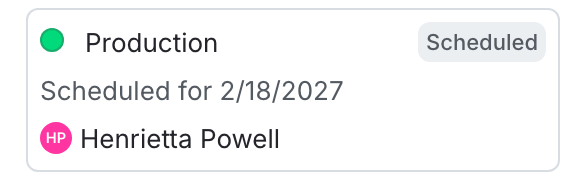
The "Pending changes" section of a flag.

The "Pending changes" section of a flag.

You can also use the REST API: List scheduled changes.