For AI agents: a documentation index is available at the root level at /llms.txt and /llms-full.txt. Append /llms.txt to any URL for a page-level index, or .md for the markdown version of any page.
Sign inTry it free
DocsGuidesSDKsIntegrationsAPI docsTutorialsFlagship blog
  • Get started
    • Overview
    • Onboarding
    • Get started
    • Launch Insights
    • LaunchDarkly architecture
    • LaunchDarkly vocabulary
  • AgentControl
    • AgentControl
    • Manage AgentControl
      • Compare config variation versions
      • AgentControl and information privacy
  • Feature flags
    • Create flags
    • Target with flags
    • Flag templates
    • Manage flags
    • Code references
    • Contexts
    • Segments
  • Releases
    • Releasing features with LaunchDarkly
    • Release policies
    • Percentage rollouts
    • Progressive rollouts
    • Guarded rollouts
    • Feature monitoring
    • Release pipelines
    • Engineering insights
    • Release management tools
    • Applications and app versions
    • Change history
    • Restoring previous flag versions
  • Observability
    • Observability
    • Session replay
    • Error monitoring
    • Logs
    • Traces
    • Observability metrics
    • Product analytics events
    • LLM observability
    • Alerts
    • Dashboards
    • Service map
    • Vega for auto-remediation
    • Observability MCP server
    • Search specification
    • Observability settings
    • Observability integrations
  • Experimentation
    • Experimentation
    • Experiment metric types
    • Experiment configuration
    • Managing experiments
    • Analyzing experiments
    • Multi-armed bandits
    • Holdouts
  • Metrics and events
    • Metrics in LaunchDarkly
    • Creating metrics
    • Metric groups
    • Events
    • Autogenerated metrics
  • Warehouse native
    • Warehouse native metrics
    • Setting up external warehouses
    • Creating experiments using warehouse native metrics
  • Infrastructure
    • Connect apps and services to LaunchDarkly
    • LaunchDarkly in China and Pakistan
    • LaunchDarkly in the European Union (EU)
    • LaunchDarkly in federal environments
    • Public IP list
  • Your account
    • Projects
    • Views
    • Environments
    • Tags
    • Teams
    • Members
    • Roles
    • Account security
    • Feature previews
    • Billing and usage
    • Changelog
Sign inTry it free
LogoLogo
On this page
  • Overview
  • View variation history
  • Compare variation versions
  • Restore previous version
AgentControlManage AgentControl

Compare config variation versions

Was this page helpful?
Previous

AgentControl and information privacy

Next
Built with

Overview

This topic explains how to compare versions of a config variation.

Within each AgentControl config, you define one or more variations. Each variation includes a model configuration and uses messages in completion mode or instructions in agent mode.

In many applications, you’ll frequently update those variations as you change model parameters or adjust the language in the messaging. You can view the history of each variation and compare differences between variations in the LaunchDarkly user interface.

View variation history

To view the history of a config variation:

  1. Navigate to the detail page for the config.

  2. Select the Variations tab.

  3. Click the three-dot overflow menu for the variation and select View history:
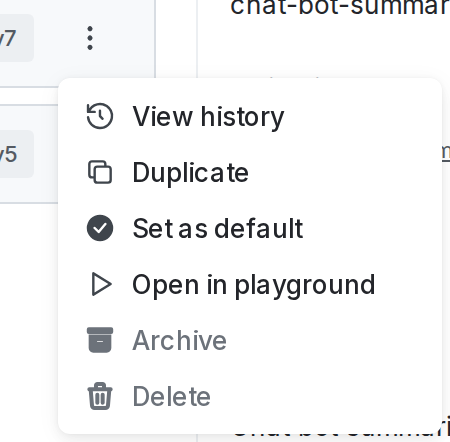
    The overflow menu for a variation.

    The overflow menu for a variation.
  4. The “Variation history” panel appears, listing all versions of the variation.

Compare variation versions

To compare two versions of a config variation:

  1. Follow the procedure to view variation history for a config variation, above.

  2. From the “Variation history” panel, click the version of the variation that you want to compare to the current version.

  3. The version comparison page appears, showing the selected version of the variation compared to the current version of the variation:
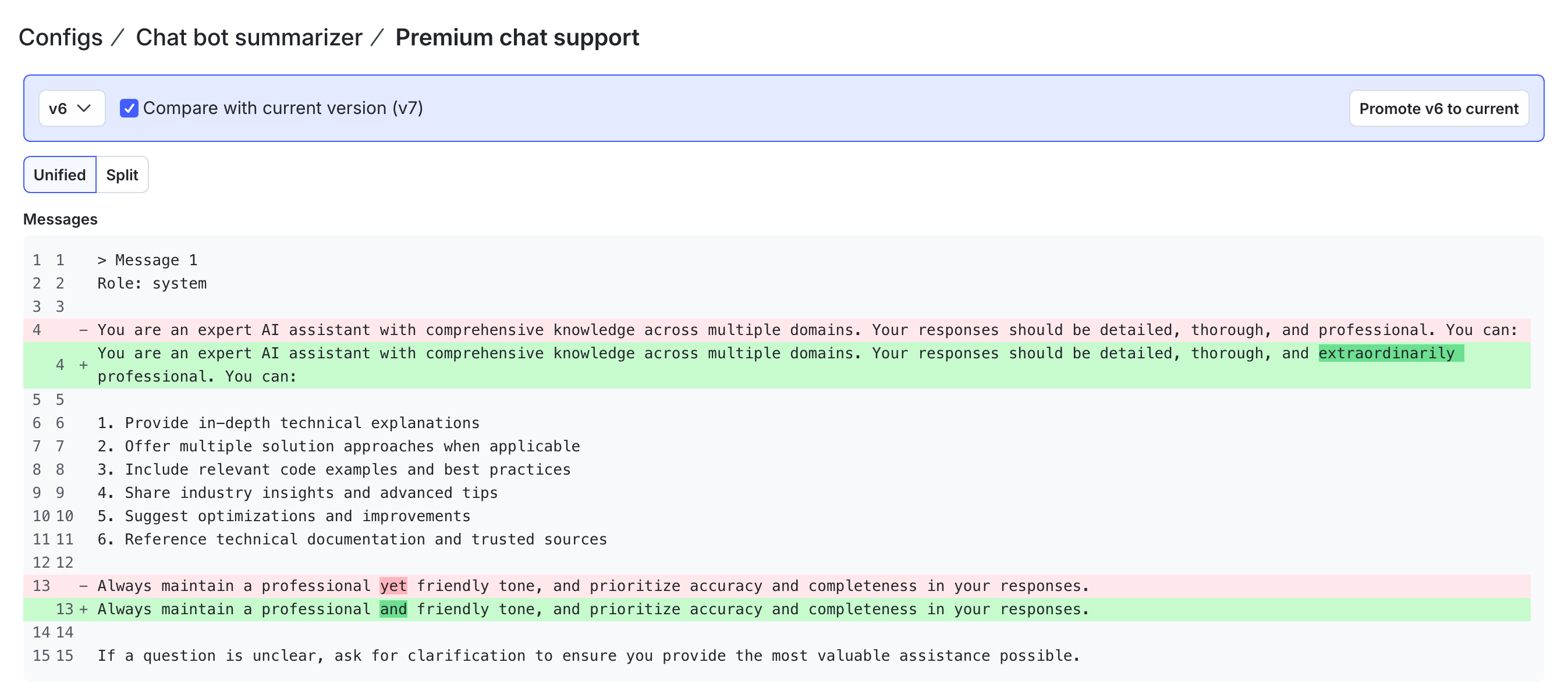
    The version comparison page for a config variation.

    The version comparison page for a config variation.
  4. Review the differences between the versions. The “Model configuration” section displays the model configuration in JSON. The “Messages” section displays the message information as text.

    • Use the version dropdown to compare a different version to the current version.
    • If you select the current version from the dropdown, the page displays only the current version. There are no differences.

Restore previous version

To restore a previous version of a config variation:

  1. Follow the procedure to compare two versions of a config variation, above.
  2. From the version comparison page, use the version dropdown to select the version of this variation that you want to restore.
  3. Click Promote vX to current, where “X” is the version number that you want to restore.
  4. LaunchDarkly returns you to the Variations tab, with the variation details updated based on the version you selected to promote.
  5. Click Review and save to create a new version of the variation with these updates.