
Playgrounds
This topic explains how to use AgentControl’s LLM playgrounds to create and run evaluations that measure the quality of model outputs before deployment. The playground provides a secure sandbox where you can experiment with prompts, models, and parameters. You can view model outputs, attach evaluation criteria to assess quality, and use a separate LLM to automatically score or analyze completions according to a rubric you define.
The playground helps AI and ML teams validate quality before deploying to production. It supports fast, controlled testing so you can refine prompts, models, and parameters early in the development cycle. The playground also establishes the foundation for offline evaluations, creating a clear path from experimentation to production deployment within LaunchDarkly.
The playground complements online evaluations. Online evaluations measure quality in production using attached judges. You can attach judges to completion-mode config variations in the LaunchDarkly UI. For other variations, invoke a judge programmatically using the AI SDK. To learn more, read Online evaluations. The playground focuses on pre-production testing and refinement.
Who uses the playground
The playground is designed for AI developers, ML engineers, product engineers, and PMs building and shipping AI-powered products. It provides a unified environment for evaluating models, comparing configurations, and promoting the best-performing variations.
Use the playground to:
- Create and run evaluations that test model outputs.
- Measure model quality using criteria such as factuality, groundedness, or relevance.
- Use an evaluator LLM to automatically score or analyze completions.
- Adjust prompts, parameters, or variables to improve performance.
- Manage and secure provider credentials in the “Manage API keys” section.
Each evaluation can generate multiple runs. When you change an evaluation and create a new run, earlier runs remain available with their original data.
How the playground works
The playground uses the same evaluation framework as online evaluations but runs evaluations in a controlled sandbox. Each evaluation contains messages, variables, model parameters, and optional evaluation criteria. When you run an evaluation, the playground records the model response, token usage, latency, and scores for each criterion.
Teams can define reusable evaluations that combine prompts, models, parameters, and variables or context. You can run each evaluation to generate completions and view structured results. You can also attach a secondary LLM to automatically score or analyze each response.
Each playground session includes:
- Evaluation setup: Messages, parameters, variables, and provider details.
- Run results: Model outputs, token counts, latency, and evaluation scores.
- Isolation: Evaluations cannot modify production configurations.
When you click Save and run, LaunchDarkly securely sends your configuration to the model provider and returns the model output and evaluation results as a new run.
Here is an example:
LaunchDarkly stores the provider credentials you add in your project’s integration configuration. Those credentials persist across playground sessions until you remove them.
Prerequisites
To use the playground, you need access to a model provider. Depending on which kind of access you use, your organization may also need to accept the LaunchDarkly AI features terms.
Model provider access
The playground needs access to a model provider before it can generate completions. There are two ways to provide it:
- Your own provider credentials: Add an API key for your model provider to your LaunchDarkly project. The playground uses that key for every run, and your usage is billed by your provider. This option is available to everyone with AgentControl access and does not require accepting additional terms. If you add your own provider credentials, the playground always uses them, and it offers the full set of models your providers support rather than the set available through LaunchDarkly-provided access. This is the most common option, and we recommend it for ongoing use. To learn more, read Manage API keys.
- LaunchDarkly-provided model access: Run playground evaluations without adding your own API key. LaunchDarkly runs these evaluations against Anthropic models using credentials that LaunchDarkly provides. This option lets you try the playground without any setup. Its daily usage cap is deliberately low and it offers a smaller set of models. It is not designed to support ongoing use. Add your own provider credentials when you are ready to work in the playground regularly. Because LaunchDarkly sends your prompts to Anthropic on your behalf, this option requires that your organization accept the LaunchDarkly AI features terms.
Accept the AI features terms
Only LaunchDarkly-provided model access requires the AI features terms. If you use your own provider credentials, the playground runs on your key and no additional terms apply.
The same terms cover other LaunchDarkly features that call an AI model on your behalf, including Vega. An account Admin or Owner records acceptance with the “Enable generative AI use cases” setting in Security settings.
How your organization accepts the terms depends on your plan:
- Most self-serve customers on a usage-based pricing plan: Your organization accepted these terms at signup, and no further action is needed.
- Eligible Foundation and Enterprise customers: An account Admin, Owner, or member with the
updateIsGeneralGenAiEnabledcustom role action accepts the terms in Security settings, using the following procedure. - All other customers: The “Enable generative AI use cases” section does not appear in your Security settings. To request access, contact your LaunchDarkly account representative.
Generative AI features, including LaunchDarkly-provided model access, are not available in federal environments.
To accept the AI features terms:
- Log in to LaunchDarkly as an Admin, Owner, or member with the required action.
- Click the gear icon in the left sidebar to view Organization settings.
- Click Security and scroll to the “Enable generative AI use cases” section.
- Select the Enable generative AI use cases checkbox.
- Click Update.
Your organization has now accepted the AI features terms.
To withdraw acceptance, uncheck the Enable generative AI use cases checkbox and click Update. This turns off the LaunchDarkly features that call an AI model on your behalf.
Create and manage evaluations
You can use the playground to create, edit, and delete evaluations. Each evaluation can include messages, model parameters, criteria, and variables.
Create an evaluation
- Navigate to your project.
- In the left sidebar, click Agents. The AgentControl menu appears.
- Click Evaluations.
- Click New evaluation.
- Select a playground to run the evaluation in. The playground page opens.
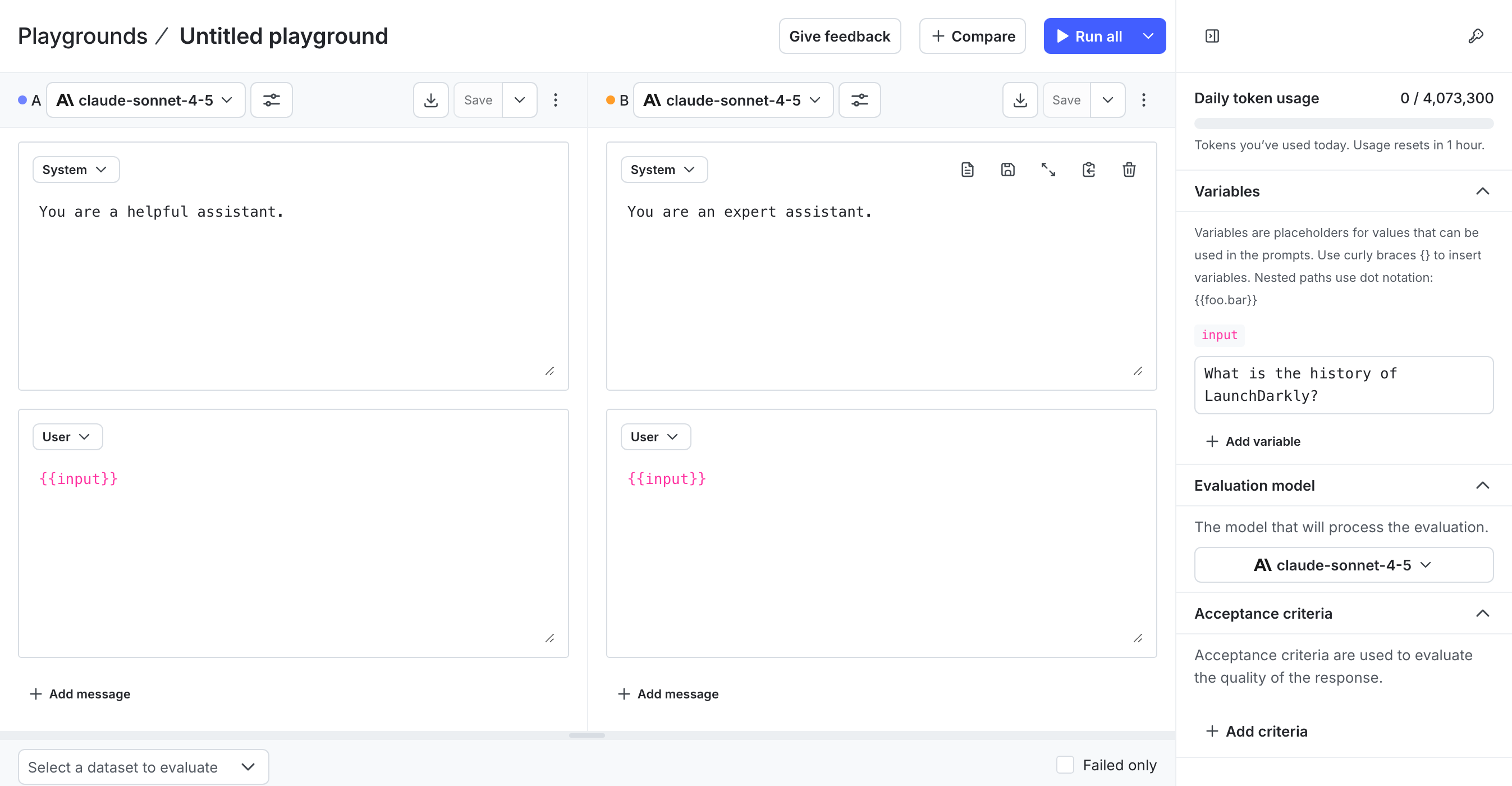
- Click Untitled playground and enter a name for the evaluation.
- Select a model provider and model.
- Add or edit messages for the System, User, and Assistant roles. These messages define how the model interacts in a conversation:
- System provides context or instructions that set the model’s behavior and tone.
- User represents the input prompt or question from an end user.
- Assistant represents the model’s response. You can include an example or leave it blank to view generated results.
- Attach one or more evaluation criteria. Each criterion defines a measurement, such as factuality or relevance, and includes configurable options such as threshold or control prompt.
- (Optional) Add variables to reuse dynamic values, such as
{{productName}}or context attributes like{{ldContext.city}}. - (Optional) Attach a scoring LLM to automatically evaluate each output.
- Click Save and run. The playground creates a new run and adds an output row with model response and evaluation scores.
Edit an evaluation
You can edit an evaluation at any time. Changes apply to new runs only. Earlier runs retain their original data.
To edit an evaluation:
- In the left sidebar, click Agents. The AgentControl menu appears.
- Click Playgrounds.
- Click the evaluation to edit.
- Update messages, model, parameters, variables, or criteria.
- Click Save and run to generate a new run with updated evaluation data.
Delete an evaluation
To delete an evaluation:
- In the left sidebar, click Agents. The AgentControl menu appears.
- Click Playgrounds.
- In the Playgrounds list, find the evaluation you want to delete.
- Click the three-dot overflow menu.
- Click Delete evaluation and confirm.
Deleting an evaluation removes its configuration and associated runs from the playground.
View evaluation runs
The Output tab shows all runs for an evaluation.
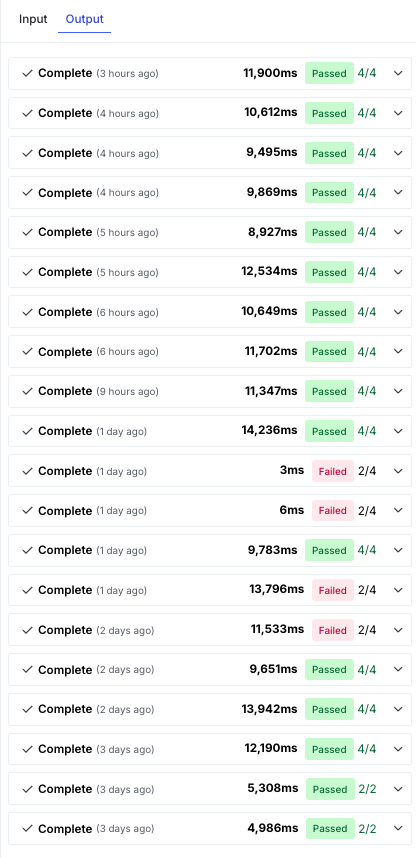
Each run includes:
- Evaluation summary
- Scores for each criterion
- Input, output, and total tokens used
- Latency
If your organization has a daily token limit set, LaunchDarkly blocks new runs after you reach it. To learn more, read Configure token limits.
Select a run to view:
- Raw output: The exact text or JSON object returned by the model.
- Evaluation results: Scores and reasoning for each evaluation criterion.
Runs update automatically when new results are available.
Manage API keys
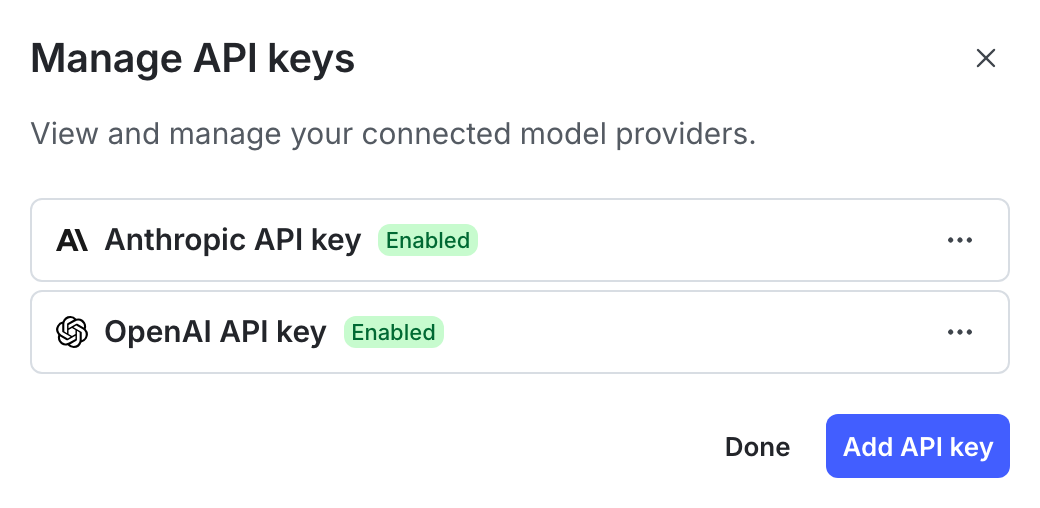
The playground uses the provider credentials stored in your LaunchDarkly project to run evaluations. You can add or update these credentials from the Manage API keys section to ensure your evaluations use the correct model access.
To manage provider API keys:
- In the upper-right corner of the playground page, click Manage API keys to open the “Integrations” page with the AgentControl Test Run integration selected.
- Click Add integration.
- Enter a name.
- Select a model provider.
- Enter the API key for your selected provider.
- Read the Integration Terms and Conditions and check the box to confirm.
- Click Save configuration.
Only one active credential per provider is supported per project. LaunchDarkly does not retain API keys beyond the session.
Connect a provider from the playground
If your project has no provider credentials yet, the playground displays a “Set up your API key” message. You can connect a provider without leaving the playground.
To connect a provider from the playground:
- Click Set up API key. The “Connect your AI provider” dialog appears.
- Select a model provider.
- Enter the API key for your selected provider.
- Click Connect.
LaunchDarkly saves the credential as a playground integration configuration. The configuration also appears on the “Integrations” page.
Connect Amazon Bedrock from the playground
Amazon Bedrock does not use an API key. When you select “Bedrock,” the dialog requests an AWS Region and an AWS Identity and Access Management (IAM) role instead. LaunchDarkly generates an External ID for the configuration and uses it to assume that role.
To connect Bedrock from the playground:
- Click Set up API key. The “Connect your AI provider” dialog appears.
- Select “Bedrock”.
- From the AWS region menu, choose the region where you want to invoke models.
- Copy the generated External ID.
- Create the IAM role in AWS, requiring the External ID you copied. To learn more, read Configure Amazon Bedrock.
- Enter the role’s Amazon Resource Name (ARN) in the AWS role ARN field.
- Click Connect.
LaunchDarkly stores the External ID shown in the dialog with the configuration. The trust policy on your role continues to match. If you close the dialog before you connect, LaunchDarkly generates a new External ID the next time you open it.
Privacy
The playground may send prompts and variables to your configured model provider for evaluation. LaunchDarkly does not store or share your inputs, credentials, or outputs outside your project.
If your organization restricts sharing personal data with external providers, ensure that prompts and variables exclude sensitive information.
To learn more, read AgentControl and information privacy.