For AI agents: a documentation index is available at the root level at /llms.txt and /llms-full.txt. Append /llms.txt to any URL for a page-level index, or .md for the markdown version of any page.
Sign inTry it free
DocsGuidesSDKsIntegrationsAPI docsTutorialsFlagship blog
  • Get started
    • Overview
    • Onboarding
    • Get started
    • Launch Insights
    • LaunchDarkly architecture
    • LaunchDarkly vocabulary
  • AgentControl
    • AgentControl
    • Manage AgentControl
  • Feature flags
    • Create flags
    • Target with flags
    • Flag templates
    • Manage flags
    • Code references
    • Contexts
    • Segments
  • Releases
    • Releasing features with LaunchDarkly
    • Release policies
    • Percentage rollouts
    • Progressive rollouts
    • Guarded rollouts
    • Feature monitoring
    • Release pipelines
    • Engineering insights
      • Get started with engineering insights
      • Project overview
      • Project metrics
        • Deployments
        • Releases
        • Lead time
        • Flag health
        • Experimentation rate
    • Release management tools
    • Applications and app versions
    • Change history
    • Restoring previous flag versions
  • Observability
    • Observability
    • Session replay
    • Error monitoring
    • Logs
    • Traces
    • Observability metrics
    • Product analytics events
    • LLM observability
    • Alerts
    • Dashboards
    • Service map
    • Vega for auto-remediation
    • Observability MCP server
    • Search specification
    • Observability settings
    • Observability integrations
  • Experimentation
    • Experimentation
    • Experiment metric types
    • Experiment configuration
    • Managing experiments
    • Analyzing experiments
    • Multi-armed bandits
    • Holdouts
  • Metrics and events
    • Metrics in LaunchDarkly
    • Creating metrics
    • Metric groups
    • Events
    • Autogenerated metrics
  • Warehouse native
    • Warehouse native metrics
    • Setting up external warehouses
    • Creating experiments using warehouse native metrics
  • Infrastructure
    • Connect apps and services to LaunchDarkly
    • LaunchDarkly in China and Pakistan
    • LaunchDarkly in the European Union (EU)
    • LaunchDarkly in federal environments
    • Public IP list
  • Your account
    • Projects
    • Views
    • Environments
    • Tags
    • Teams
    • Members
    • Roles
    • Account security
    • Feature previews
    • Billing and usage
    • Changelog
Sign inTry it free
LogoLogo
On this page
  • Overview
  • Metrics summary
  • Metrics
  • Velocity
  • Risk
  • Efficiency
ReleasesEngineering insights

Project metrics

Was this page helpful?
Previous

Deployments

Next
Built with
Engineering insights is available in LaunchDarkly's European Union (EU) instance
To learn more, read LaunchDarkly in the European Union (EU).
Engineering insights is available to customers on select plans

Engineering insights is only available to customers on select plans. To learn more, read about our pricing. To upgrade your plan, contact Sales.

Overview

This category contains documentation topics about LaunchDarkly’s engineering insights project metrics. The project summary provides an overview of several metrics to help you track and optimize your deployments and releases.

Metrics summary

The “Summary” section provides high-level ratings in the following categories:

  • Release maturity: an overall rating calculated using the project’s velocity, risk, and efficiency scores
  • Velocity: calculated using your project’s deployment frequency and lead time
  • Risk: calculated using your project’s failure rate and change impact size
  • Efficiency: calculated using your project’s flag health and Experimentation rate, if applicable

Here is an example project summary with ratings for each area:
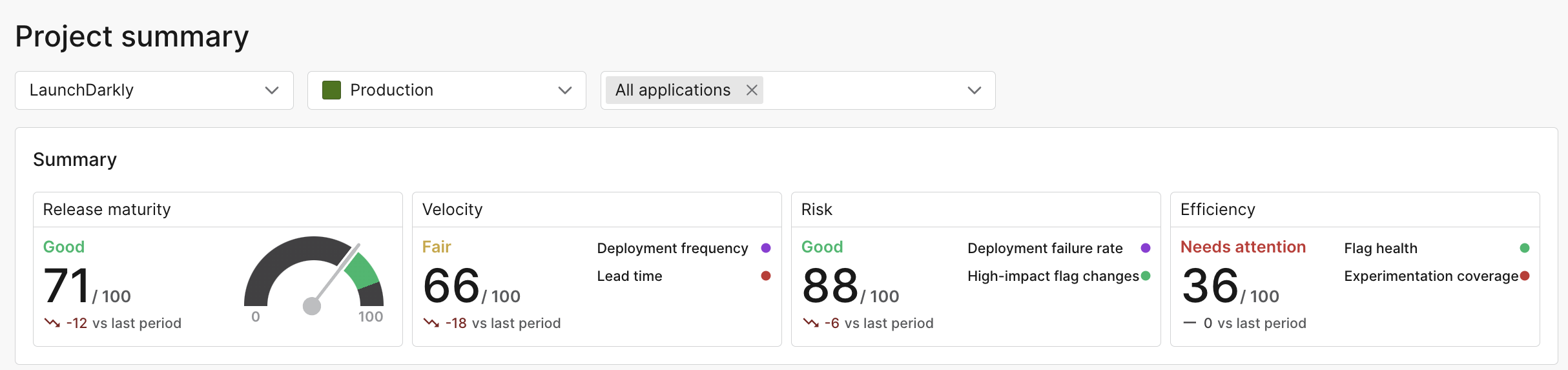
The project summary.

The project summary.

Each category is rated on a scale from 1-100, using the following categories:

  • Excellent: 90-100
  • Good: 70-89
  • Fair: 40-69
  • Needs attention: 0-39

The sections below explain the individual metrics that LaunchDarkly uses to determine your project ratings.

Metrics

In LaunchDarkly, a deployment is a new code change your team has introduced to an environment, and a release is when you change how customers experience your application. These metrics are often significantly different for teams that have adopted feature flagging, so you need to track both to fully understand how and when changes are going out to your customers.

You can refine your dashboard view by narrowing by project, environment, application, and date range:

The project summary page with the project, environment, application, and date range fields.

The project summary page with the project, environment, application, and date range fields.

To provide insight on speed and stability for both deployments and releases, the project summary includes the following categories.

Velocity

The velocity category includes the following metrics:

  • Deployment frequency: The number of deployments per time period. This page includes a table of recent deployments, total rollback deployments, their details, and their statuses. To learn more, read Deployments.
  • Lead time: The time from first code commit to deployment. This page breaks the total lead time into steps, including coding time, pull request (PR) lifespan, deployment wait time, and deployment duration. It also includes a table of recent PRs and the environments you deployed them to. To learn more, read Lead time.

Risk

The risk category includes the following metrics:

  • Deployment failure rate: The number of deployments that were rolled back per time period. To learn more, read about the deployments list.
  • Large-impact flag changes: The number of flag changes that had a significant impact on your end users. To learn more, read Releases.

Efficiency

The efficiency category includes the following metrics:

  • Stale flags: The ratio of stale flags to the total number of temporary flags for the selected environment. This page includes a summary of stale flags and recommendations for which flags can be removed. To learn more, read Flag health.
  • Experimentation rate: The number of flag changes that are associated with an experiment. This page includes a table of recent flag changes by change type and flag key. To learn more, read Experimentation rate.