
Editing and archiving multi-armed bandits
Editing and archiving multi-armed bandits
This topic explains how to edit a multi-armed bandit (MAB) and archive it when you no longer need it.
Edit multi-armed bandits
You can make changes to the name, goal, randomization unit, metrics, and audience of an existing MAB. Changing the audience of a running MAB requires you to stop the MAB, update the audience, and then start a new iteration.
After you create a MAB, you cannot edit its flag or the flag’s variations. If you want to use a different flag or a different flag variation, you must create a new MAB.
Change multi-armed bandit settings
You can change a MAB’s name and goal at any time without affecting the results of the MAB.
If you want to begin measuring a completely different randomization unit or metric as part of a MAB, we recommend creating a new MAB instead of editing an existing one. If you want to use a similar metric, you can change the metric associated with a MAB.
To change a MAB’s name, goal, metric, or randomization unit:
- Navigate to the Design tab of your MAB.
- Click Edit design.
- Edit the Name or Goal as needed.
- Choose new Metrics as needed.
- Choose a new randomization unit from the Randomize by menu as needed.
- Scroll to the top of the page and click Save.
- If the MAB was running when you made edits, a “Save multi-armed bandit design?” dialog appears. Enter a reason for the change and click Save & start new iteration.
Change multi-armed bandit audiences
To edit the audience of a MAB, you must stop the MAB iteration, make the audience update, and start a new iteration. This lets you select a flag variation to serve to any contexts that will no longer be included in the MAB.
To edit the audience of a MAB:
- Navigate to the Design tab of your MAB.
- Click Stop, or if your environment requires approvals, click Request approval to stop. The “Stop multi-armed bandit” dialog appears.
- Select a variation to serve while the MAB is stopped.
- Enter a Reason for stopping.
- Click Stop multi-armed bandit.
- Click Edit design.
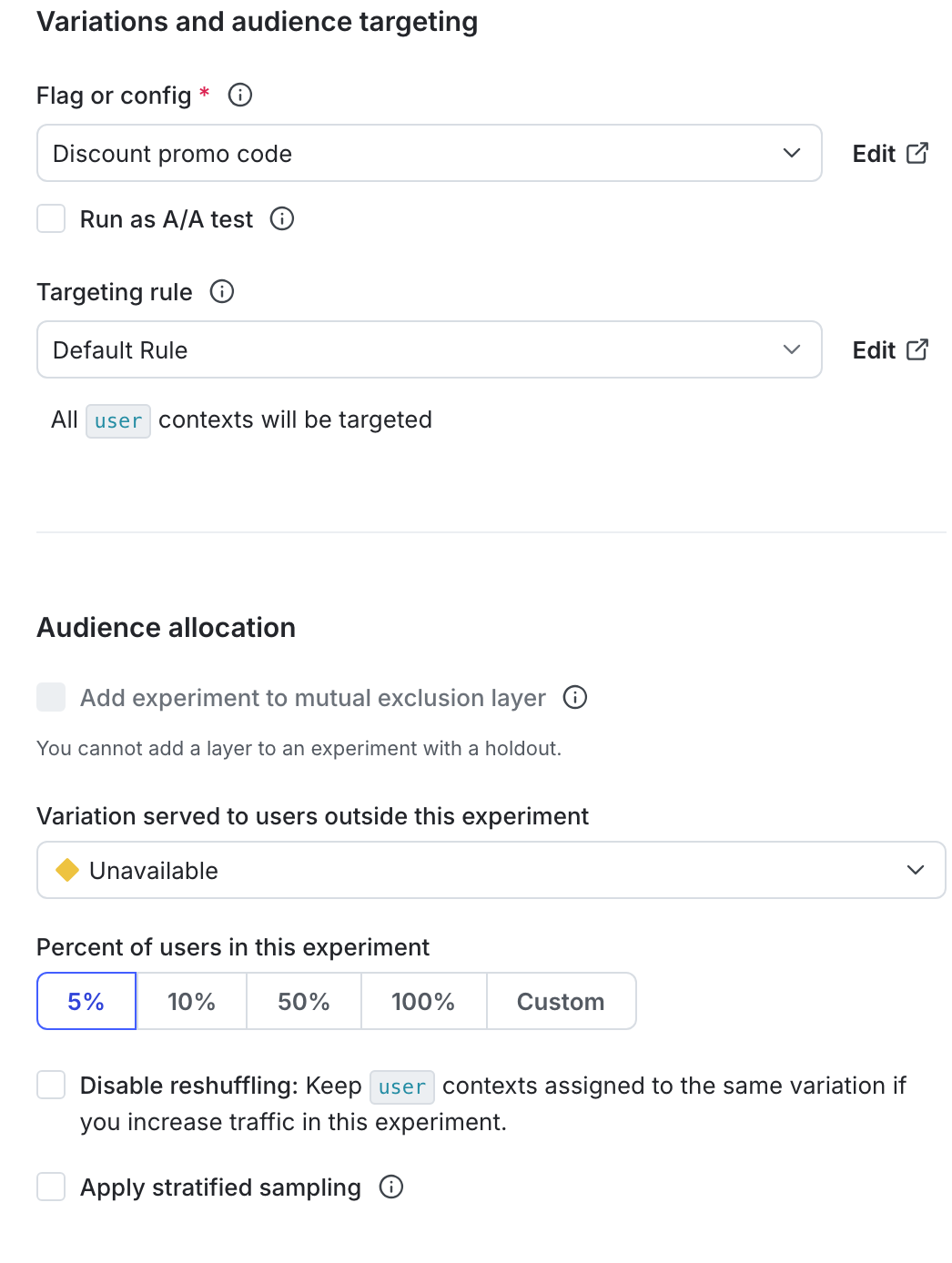
- Navigate to the “Audience targeting” section and update the audience as needed.
- You can also update the percentage of contexts to serve the MAB to.
- Scroll to the top of the page and click Save.
- Click Start, or, if your environment requires approvals, click Request approval to start. A “Start experiment” dialog appears.
- If your environment does not require approvals, but you want to request approval anyway, click the down arrow next to the Start button and click Request approval to start.
- (Optional) If the flag is off, click Toggle on flag.
Archive and restore multi-armed bandits
You can archive MABs that have concluded, as well as the flags and metrics attached to them, but you cannot permanently delete MABs. Archiving MABs preserves the results so you can refer to them in the future.
Before you can archive a MAB:
- The MAB must not be running. To learn how to stop a MAB, read Stop experiment iterations.
- The MAB must not be included in a layer. To learn how to remove a MAB from a layer, read Remove experiments from layers.
LaunchDarkly hides archived MABs from the Multi-armed bandits list. You cannot start new iterations for archived MABs.
When you archive or restore a MAB, LaunchDarkly sends the maintainer and anyone following the MAB an email, an in-app notification, and, if you have the Slack app integration configured, a Slack notification.
Archive multi-armed bandits
To archive a MAB:
- Navigate to the Multi-armed bandits list in the environment where you want to archive a MAB.
- Click on the three-dot overflow menu of the MAB you want to archive.
- Select Archive.
To view archived MABs on the Multi-armed bandits list, click Filters and select Yes in the “Archived” section.
To switch back to viewing active MABs, click View and select No in the “Archived” section.
Restore multi-armed bandits
To restore a MAB, navigate to the MAB Design tab and click restore this multi-armed bandit.
MABs and MAB settings are specific to single environments. If you want to run the same MAB in different environments, you must create and run the MAB in each environment individually.

You can also use the REST API: Patch experiment