AgentControl config autogenerated metrics
This topic describes metrics that LaunchDarkly autogenerates from AgentControl config events.
An AgentControl config is a resource that you create in LaunchDarkly and then use to customize, test, and roll out new large language models (LLMs) within your generative AI applications. As soon as you start using AgentControl in your application, your AI SDKs begin sending events to LaunchDarkly and you can track how your AI model generation is performing.
AI SDK events are prefixed with $ld:ai and LaunchDarkly automatically generates metrics from these events.
Some events generate multiple metrics that measure different aspects of the same event. For example, the $ld:ai:feedback:user:positive event generates a metric that measures the average number of positive feedback events per user, and a metric that measures the percentage of users that generated positive feedback.
The following expandable sections explain the metrics that LaunchDarkly autogenerates from AI SDK events:
Positive AI feedback count $ld:ai:feedback:user:positive
Positive AI feedback count $ld:ai:feedback:user:positive
Metric kind: Custom conversion count
Suggested analysis unit: User
Definition:
- Measurement method: Count
- Unit aggregation method: Sum
- Analysis method: Average
- Success criterion: higher is better
- Units without events: Include units and set the value to
0
Description: Average number of positive feedback events per context
Example usage: Running an experiment to find out which variation causes more users to click “thumbs up”
Positive AI feedback rate $ld:ai:feedback:user:positive
Positive AI feedback rate $ld:ai:feedback:user:positive
Metric kind: Custom conversion binary
Suggested analysis unit: Request
Definition:
- Measurement method: Occurrence
- Unit aggregation method: Average
- Analysis method: Average
- Success criterion: higher is better
- Units without events: Include units and set the value to
0
Description: Percentage of contexts that generated positive AI feedback
Example usage: Running a guarded rollout to make sure there is a positive feedback ratio throughout the rollout
Negative AI feedback count $ld:ai:feedback:user:negative
Negative AI feedback count $ld:ai:feedback:user:negative
Metric kind: Custom conversion count
Suggested analysis unit: User
Definition:
- Measurement method: Count
- Unit aggregation method: Sum
- Analysis method: Average
- Success criterion: lower is better
- Units without events: Include units and set the value to
0
Description: Average number of negative feedback events per context
Example usage: Running an experiment to find out which variation causes more users to click “thumbs down”
Negative AI feedback rate $ld:ai:feedback:user:negative
Negative AI feedback rate $ld:ai:feedback:user:negative
Metric kind: Custom conversion binary
Suggested analysis unit: User
Definition:
- Measurement method: Occurrence
- Unit aggregation method: Average
- Analysis method: Average
- Success criterion: lower is better
- Units without events: Include units and set the value to
0
Description: Percentage of contexts that generated negative AI feedback
Example usage: Running an experiment to find out which variation causes more users to click “thumbs down”
Average input tokens per AI completion $ld:ai:tokens:input
Average input tokens per AI completion $ld:ai:tokens:input
Metric kind: Custom numeric
Suggested analysis unit: Request
Definition:
- Measurement method: Value/size
- Unit aggregation method: Average
- Analysis method: Average
- Success criterion: higher is better
- Units without events: Exclude units that generate no events
Description: For example, for a chatbot, this might indicate user engagement
Example usage: Running an experiment to find out which variation generates more input tokens, indicated better engagement
Average output tokens per AI completion $ld:ai:tokens:output
Average output tokens per AI completion $ld:ai:tokens:output
Metric kind: Custom numeric
Suggested analysis unit: Request
Definition:
- Measurement method: Value/size
- Unit aggregation method: Average
- Analysis method: Average
- Success criterion: lower is better
- Units without events: Exclude units that generate no events
Description: Indicator of cost, when charged by token usage
Example usage: Running an experiment to find out which variation results in fewer output tokens, reducing cost
Average total tokens per AI completion $ld:ai:tokens:total
Average total tokens per AI completion $ld:ai:tokens:total
Metric kind: Custom numeric
Suggested analysis unit: Request
Definition:
- Measurement method: Value/size
- Unit aggregation method: Average
- Analysis method: Average
- Success criterion: lower is better
- Units without events: Exclude units that generate no events
Description: Indicator of cost, when charged by token usage
Example usage: Running an experiment to find out which variation results in fewer total tokens, reducing cost
Average AI completion time $ld:ai:duration:total
Average AI completion time $ld:ai:duration:total
Metric kind: Custom numeric
Suggested analysis unit: Request
Definition:
- Measurement method: Value/size
- Unit aggregation method: Average
- Analysis method: Average
- Success criterion: lower is better
- Units without events: Exclude units that generate no events
Description: Time required for LLM to finish a completion
Example usage: Running an experiment to find out which variation results in faster user completion, improving engagement
AI completion success count $ld:ai:generation:success
AI completion success count $ld:ai:generation:success
Metric kind: Custom conversion count
Suggested analysis unit: User
Definition:
- Measurement method: Count
- Unit aggregation method: Sum
- Analysis method: Average
- Success criterion: higher is better
- Units without events: Include units and set the value to
0
Description: Counter for successful LLM completion requests
Example usage: Running an experiment to find out which variation results in more user completion requests (“chattiness”), improving engagement
AI completion error count $ld:ai:generation:error
AI completion error count $ld:ai:generation:error
Metric kind: Custom conversion count
Suggested analysis unit: User
Definition:
- Measurement method: Count
- Unit aggregation method: Sum
- Analysis method: Average
- Success criterion: lower is better
- Units without events: Include units and set the value to
0
Description: Counter for erroneous LLM completion requests
Example usage: Running a guarded rollout to make sure the change doesn’t result in a higher number of errors
Average time to first token for AI requests $ld:ai:tokens:ttf
Average time to first token for AI requests $ld:ai:tokens:ttf
Metric kind: Custom Numeric
Suggested analysis unit: User
Definition:
- Measurement method: Value/size
- Unit aggregation method: Average
- Analysis method: Average
- Success criterion: lower is better
- Units without events: Exclude units that generate no events
Description: Time required for LLM to generate first token
Example usage: Running a guarded rollout to make sure the change doesn’t result in longer token generation times
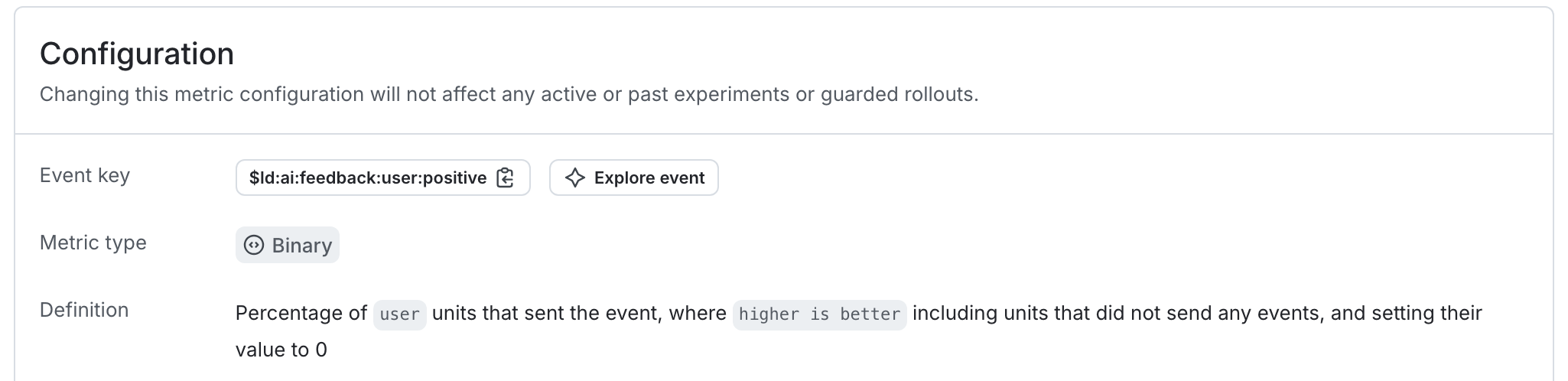
As an example, the autogenerated metric in the first expandable section above tracks the average number of positive feedback ratings per user.
Here is what the metric setup looks like in the LaunchDarkly user interface: